on a 16f like this
Code:
;16f1825#CONFIG
             __config        _CONFIG1,    _FOSC_INTOSC & _CP_OFF & _WDTE_OFF &  _PWRTE_ON  &  _MCLRE_ON  & _CLKOUTEN_OFF
              __config      _CONFIG2, _PLLEN_ON & _LVP_OFF
#ENDCONFIG


DEFINE OSC 32
    OSCCON=$70
    ANSELA=0
    ANSELC=0
    TRISA = %001110
    trisc = %11100010     ' set PORTC I/O
    Strings CON EXT


    i VAR BYTE
    Char VAR BYTE
    ctemp  VAR WORD
    StringNumber VAR BYTE
    StartAddress VAR WORD
    rand      VAR WORD
    lata.0=1
    DEFINE DEBUG_REG PORTA
    DEFINE DEBUG_BIT 0      ;  if not used for pwr
    DEFINE DEBUG_BAUD 9600
    DEFINE DEBUG_MODE 0
    pause 2000
    Debug "Start",13 ,10
Goto OverStrings
ASM
Strings
    ; Strings, fixed length, 20 characters including null terminator.
    ; Actual string terminatesends with a NULL and is then padded to exactly 20 chars.
    da "Set Year", 0, "           "    ; 0
    da "Set Month", 0, "          "    ; 1
    da "Set Date", 0, "           "    ; 2
    da "Set day of week", 0, "    "    ; 3
    da "Set Hour", 0, "           "    ; 4
    da "Set Minute", 0, "         "    ; 5
    da "Set alarm mode", 0, "     "    ; 6
    da "Off", 0, "                "    ; 7
    da "On all week", 0, "        "    ; 8
    da "On without weekends", 0, ""    ; 9
    da "Set alarm hours", 0, "    "    ; 10
    da "Set alarm minutes", 0, "  "    ; 11
    da "Set display format", 0, " "    ; 12
    da "Imperial (12Hr/F)", 0, "  "    ; 13
    da "Metric (24Hr/C)", 0, "    "    ; 14
    da "Display brightness", 0, " "    ; 15
    da "Auto", 0, "               "    ; 16
    da "25%", 0, "                "    ; 17
    da "50%", 0, "                "    ; 18
    da "75%", 0, "                "    ; 19
    da "100%", 0, "               "    ; 20
ENDASM
OverStrings:


Start:
    Debug "Program start",13,10
    Debug "Address of first string: $", HEX4 Strings, 13 ,10


Action:
     RANDOM  rand
    StringNumber = rand//20                               ' Select which string to print
    GOSUB PrintString                               ' And, you guessed it, go print it.
     PAUSE 1000
    goto  Action
END


PrintString:
    StartAddress = Strings + (StringNumber * 11)    ' Precalculate address of first char of string in question
    For i = 0 to 19                                 ' Maximum string length is 20 characters
        ReadCode (StartAddress + i), CTEMP           ' Get a char from string in question.
      Char = (CTEMP>>7)
        IF (Char = 0) THEN EXIT                     ' Break out if char is NULL
        Debug Char                                   ' Otherwise print it
     Char = CTEMP&$7f
       IF (Char = 0) THEN EXIT                     ' Break out if char is NULL
        Debug Char                                ' Otherwise print it
    NEXT
RETURN
or if all that padding is troubling , using random length null terminated strings
Code:
;16f1825#CONFIG
             __config        _CONFIG1,    _FOSC_INTOSC & _CP_OFF & _WDTE_OFF &  _PWRTE_ON  &  _MCLRE_ON  & _CLKOUTEN_OFF
              __config      _CONFIG2, _PLLEN_ON & _LVP_OFF
#ENDCONFIG


DEFINE OSC 32
    OSCCON=$70
    ANSELA=0
    ANSELC=0
    TRISA = %001110
    trisc = %11100010     ' set PORTC I/O
    Strings CON EXT
    i VAR BYTE
    Char VAR BYTE
    ctemp  VAR WORD
    rand   VAR WORD
    StringNumber VAR BYTE
    StartAddress VAR WORD
    isa   VAR WORD
    lata.0=1
    DEFINE DEBUG_REG PORTA
    DEFINE DEBUG_BIT 0      ;  if not used for pwr
    DEFINE DEBUG_BAUD 9600
    DEFINE DEBUG_MODE 0
    pause 2000
    Debug "Start",13 ,10
Goto OverStrings
ASM
Strings
    ;  string terminates with a NULL
    da "Set Year", 0     ; 0
    da "Set Month", 0     ; 1
    da "Set Date", 0    ; 2
    da "Set day of week", 0    ; 3
    da "Set Hour", 0     ; 4
    da "Set Minute", 0     ; 5
    da "Set alarm mode", 0     ; 6
    da "Off", 0    ; 7
    da "On all week", 0     ; 8
    da "On without weekends", 0   ; 9
    da "Set alarm hours", 0    ; 10
    da "Set alarm minutes", 0     ; 11
    da "Set display format", 0    ; 12
    da "Imperial (12Hr/F)", 0    ; 13
    da "Metric (24Hr/C)", 0    ; 14
    da "Display brightness", 0    ; 15
    da "Auto", 0    ; 16
    da "25%", 0     ; 17
    da "50%", 0    ; 18
    da "75%", 0     ; 19
    da "100%", 0     ; 20
    dw 3            ;eof
ENDASM
OverStrings:


Start:
    Debug "Program start",13,10
    Debug "Address of first string: $", HEX4 Strings, 13 ,10


Action:
    RANDOM  rand
    StringNumber = rand//20                             ' Select which string to print
    GOSUB findIndex
    GOSUB PrintString                               ' And, you guessed it, go print it.
    PAUSE 1000
    goto  Action
END


findIndex:
    isa    = Strings
    while StringNumber
        ReadCode isa, CTEMP
        isa=isa+1
        if  CTEMP ==3 then
            isa=0
            return
        endif
        if (CTEMP.highbyte==0) then
            StringNumber=StringNumber-1
            if    StringNumber == 0 then  return
        endif
    wend
return


PrintString:
    if  isa then
        Debug 13,10
        For i = 0 to 19                                 ' Maximum string length is 20 characters
            ReadCode (isa + i), CTEMP           ' Get a char from string in question.
            Char = (CTEMP>>7)
            IF (Char = 0) THEN EXIT                     ' Break out if char is NULL
            Debug Char                                   ' Otherwise print it
            Char = CTEMP&$7f
            IF (Char = 0) THEN EXIT                     ' Break out if char is NULL
            Debug Char                                ' Otherwise print it
        NEXT
    endif
RETURN
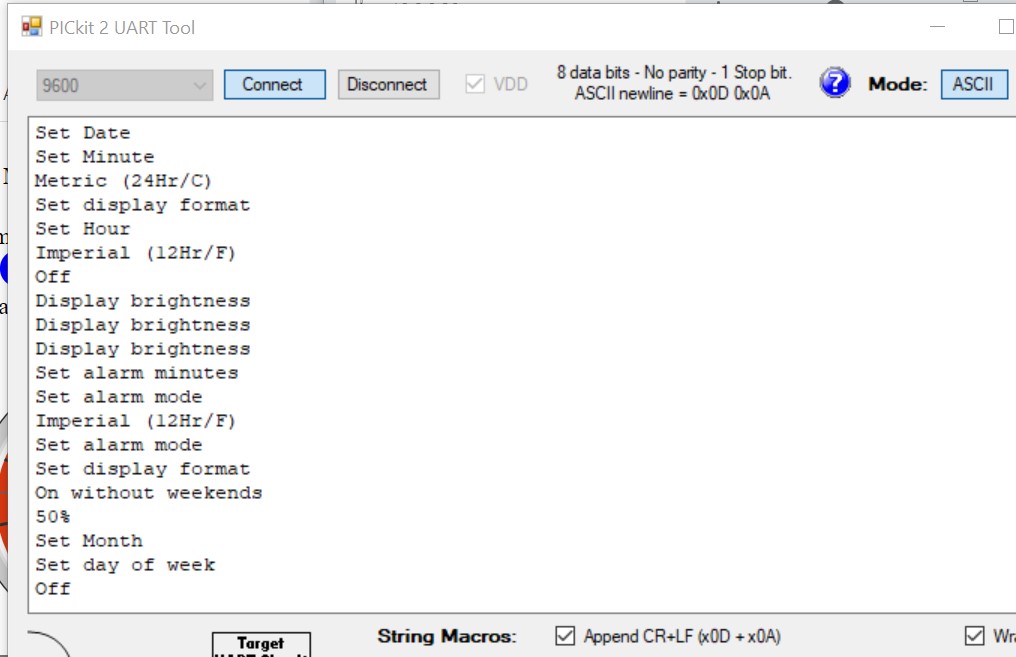


 Handling a lot of text data, any simple and practical ways?


Bookmarks