


Out of interest what supplier are you using to get the chips and what price ?
The schematic is not mine - it was used as a guide, however the values of resistors etc are the same, and what is used in the STV pdf.

 |
|

 Re: A little HELP!!
Out of interest what supplier are you using to get the chips and what price ?
The schematic is not mine - it was used as a guide, however the values of resistors etc are the same, and what is used in the STV pdf.
 |
Re: A little HELP!!
|
Re: A little HELP!!
Hi Aerostar!
Just wanted to update everyone on the progress! The schematic was a big help! I had used a different schematic and had character timing problems. One line would be shifted left and the next line was 1 pixel right! Now the text is perfect thanks to you! Again I appreciate everything you have done. You are the best!
Sincerely, Ed
|
Re: A little HELP!!
Hi Aerostar!
For some reason, probably needing new glasses,I miss your question about where to buy and cost! Here is the link: https://www.utsource.net/search.aspx...chWay=1&page=1
Best, Ed
|
Re: A little HELP!!
Hi!
Not sure if anyone is still watching this thread and I would love to ask a few more questions if it would be okay?
Thanks, Ed
 |
Re: A little HELP!!
|
Re: A little HELP!!
Hi Ed,
Seems like you are making some progress on this project. I was tempted to purchase some chips from the supplier, but now think will wait a while longer to see how your results conclude. I was a little concerned given how long these devices have been EOL about them being actually genuine. So will be an interesting story to hear how you finally progress & about any discoveries you make along the way.
Certainly aerostar has proven the code for usage on the NTSC video standard with real life testing of his original prototype boards.
Mike.
|
Re: A little HELP!!
The chips as far as I know were never cloned, so I would say UTsource are genuine. It is a specialised IC and were used by cctv companies and video equipment manufacturers. In the UK they are still being used in the Amateur radio fraternity. It is a long time since EOL, but they are still very useful.
If you go here http://dunstabledownsradioclub.org and choose TV Streams, GB3TZ in beacon mode (when not being used) the display is done using the STV chip, controlled by a Pic micro - (done in assembler, not by me) , the Pic also controls the repeater logic.
My involvement in these chips - way back in 2003ish was to insert time overlay in cctv systems which did not have their own OSD, and using MSF or GPS to provide accurate time.
|
Re: A little HELP!!
Hi All!
When I purchased the chips the fact that they were offering large quantities at a discount suggested they were still being manufactured. Okay back to the code stuff. In the beginning of the code there are "con" statements and yet there does not seem to be any reference to these statements. Why are these statements part of the code? "NTSC." appears on the screen with or without a video reference. I wish to get to the point where I can place text such as STBRPM (Starboard RPM) and PORTRPM (Port RPM with a variable of 4 digits following the text while there is a video input signal from a camera. How can this be done? Maybe I could start with something simple such as moving the "NTSC." from the right side of the screen to the left? Again my greatest thanks!
Ed
|
Re: A little HELP!!
Some "Con" statements left over from debug etc code that was stripped out as I said somewhere earlier, and were also used as memory jogger.
NTSC. will appear as this program always sends on screen refresh regardless of whether there is video input or not, it is down to you what you wish to be displayed with or without incoming video, it was for video repeater ident.
This is the part you need to understand about placing text on screen
HEADER:
LINECOUNTER=2 'SET START POSITION ********* line 3 from top (0-2 = 3!)
CHARCOUNTER=23 'SET CURSOR POSITION***********Character position start 23rd from left
GOSUB SETLINE
FOR CHARS2=0 TO 4
READ CHARS2, ASCCHAR
gosub GETSTVCHAR 'CONVERT ASCII TO STV
GOSUB DISPLAYCHAR
NEXT
RETURN
NOVIDEO:
LINECOUNTER=5 'SET START POSITION
CHARCOUNTER=4 'SET CURSOR POSITION
GOSUB SETLINE
FOR CHARS2=6 TO 23 ' FROM EEPROM DATA
READ CHARS2, ASCCHAR
gosub GETSTVCHAR 'CONVERT ASCII TO STV
GOSUB DISPLAYCHAR
NEXT
RETURN
with regards to getting your RPMs on screen the DIG command would probably help,
so if you had a reading of 2400 as rpm in a word byte RPM, I THINK (following is UNTESTED)
ASCCHAR = RPM DIG 1
This gives a value of 2, and as it happens the character matrix in the chip will display 2 as if you look at the table the numbers come first
then
GOSUB DISPLAYCHAR
then
ASCCHAR = RPM DIG 2
This gives a value of 4
and so on to dig 4, you could make a loop to do this.
Not quite sure what happens if the value is below 1000, but you could easily check that prior to doing DIG 4 and put a blank there instead, skipping the DIG 4.
|
Re: A little HELP!!
Thank you and I am feeling incredibly stupid right now, even after 4 Excedrin's! I think I understand part of this, "RPM" is the variable where the RPM reading is stored? "DIG" is the number of digits to be displayed? So RPM DIG 4 would display 4 digits? Where do you inset the "ASCCHAR = RPM DIG 4? I think this line goes after "GOSUB SETLINE"? Then how do you display "RPM" in front of the reading? Please excuse what seems to be basic, simple questions and once I stop having brain craps things should get better!
Ed
|
Re: A little HELP!!
If I asked you what the 2nd digit was of 2400 (normal reading left to right) you would immediately tell me 4 - congratulations you have just done a DIG 2,Originally Posted by Ramius

RPM is a variable name suggested where you would store the reading from whatever interface you have on the motors.
DIG X just gives you the value of the single digit starting from the left hand side.
so if as I said above your RPM was 2400
DIG 4 would return 0 ie the last digit of 2400.
DIG 2 would return 4 ie the second digit
You set the line where you want the data to be shown
set the cursor where you want the first character of your data to start
For "RPM" in front
ASCCHAR="R"
GOSUB GETSTVCHAR 'CONVERT ASCII TO STV
GOSUB DISPLAYCHAR
repeat the above 3 lines for "P", "M" and " "
now use the RPM word variable where you have stored your reading (RPM for instance)
ASCCHAR = RPM DIG 1
This gives a value of 2, and as it happens the character matrix in the chip will display 2 as if you look at the table the numbers come first
then
GOSUB DISPLAYCHAR
then
ASCCHAR = RPM DIG 2
This gives a value of 4
GOSUB DISPLAYCHAR
ASCCHAR = RPM DIG 3
This gives a value of 0
GOSUB DISPLAYCHAR
ASCCHAR = RPM DIG 4
This gives a value of 0
GOSUB DISPLAYCHAR
so on the screen at the line you have selected starting at the position you have selected, you would have RPM 2400
|
Re: A little HELP!!
Hi!
My code does not work!!NTSC. no longer displays which is understandable. The code complies and when I run it nothing is displayed! Must have missed something basic?
Code:'**************************************************************** '* Name : NTSC-1 * '* Author : Ed Cannady * '* Notice : Copyright (c) 2017 * '* : All Rights Reserved * '* Date : 06-30-17 * '* Version : 1.0 * '* Notes : VIDEO IDENT * '* : WITH GREAT HELP FROM AEROSTAR * '**************************************************************** ' WORKS USES SYNC FOR SWITCHING BETWEEN MIXED AND FULL TEXT MODE ' GOING FROM VID IN TO TEXT AND BACK TO VID IN #CONFIG __config _HS_OSC & _WDT_ON & _MCLRE_ON & _LVP_OFF & _CP_OFF #ENDCONFIG define OSC 20 '--------------------------------------------------------------- '16f628a ED definitions TVSDA VAR PORTB.4 '0 OUTPUT to pin 11 of stv chip CS0 VAR PORTB.6 '0 OUTPUT to pin 13 of stv chip TVSCL VAR PORTB.5 '0 OUTPUT to pin 12 of stv chip SYNCH0 VAR PORTB.7 '1 INPUT to pin 7 of stv chip '--------------------------------------------------------------- ZOOMREG CON %0000000011001100 ' 12 ZOOM REGISTER COLREG CON %0000000011001101 ' 13 COLOUR REGISTER CONREG CON %0000000011001110 ' 14 CONTROL REGISTER POSREG CON %0000000011001111 ' 15 POSITION REGISTER MODEREG CON %0000000011010000 ' 16 MODE REGISTER ICOUNT VAR BYTE BITCOUNTER VAR BYTE WDATA VAR WORD CHARCOUNTER VAR BYTE LINECOUNTER VAR BYTE STVCHAR VAR BYTE ASCCHAR VAR BYTE CHARS VAR BYTE CHARS2 VAR BYTE TEMP VAR BYTE TEMP1 VAR BYTE COUNTER VAR BYTE PULSES VAR BYTE CURRENTMODE0 VAR BYTE PRPM VAR WORD '---------------------------------------------------------------- ' TOPLEFT CON 0 ' TOPMIDDLE CON 5 ' TOPRIGHT CON 10 ' BOTLEFT CON 2560 '10*256 ' BOTMIDDLE CON 2565 '(10*256)+ 5 ' BOTRIGHT CON 2570 '(10*256)+ 10 '---------------------------------------------------------------- DATA @0,"NTSC.",$FF,"NO SYNCHS RECEIVED",$FF TRISB = %10001111 '---------------------------------------------------------------- PAUSE 500 GOSUB Init PAUSE 500 GOSUB Init CURRENTMODE0=255 ' FORCES TRYSYNCHS TO SET MODE FIRST TIME Demo: CHARCOUNTER = 0 LINECOUNTER = 0 ' CURRENTMODE0 = 0 '0 = MIXED 1 = TEXT gosub CLS GOSUB TRYSYNCHS '================================== TEMP = 0 LOOPER: PRPM = 6789 GOSUB HEADER ' LINE 3 RIGHT HAND SIDE TEST. IF CURRENTMODE0=1 THEN GOSUB NOVIDEO ' DISPLAYS NO VIDEO IF NO INCOMING SYNCHS ENDIF GOSUB TRYSYNCHS '=========================== ' PAUSE 500 'I/2 SECOND DELAY ' TOGGLE HEARTBEAT ' LED GOTO LOOPER 'DO IT FOREVER DISPLAYCHAR: WDATA = %0001010000000000 + STVCHAR ' 11 10 9 8 7654 3210 ' WDATA = %0001 0 1 1 1 0000 0000 + STVCHAR ' bit 11 = character background 0 = disabled 1 = enabled ' bit 10 = red ' bit 09 = green ' bit 08 = blue ' 000 = black ' 001 = blue ' 010 = green ' 011 = cyan ' 100 = red ' 101 = magenta ' 110 = yellow ' 111 = white ' bit 7 = blink 1=enable 0=disable GOSUB SEND RETURN SETLINE: WDATA = LINECOUNTER*256 + CHARCOUNTER GOSUB Send 'position cursor RETURN WasteTime: ' WORKS WITH LESS NOPS pauseus 20 ' was 20 nops RETURN StartCommunication: TVSCL = 1 'HIGH TVSCL GOSUB WasteTime CS0 = 0 'LOW CS0 GOSUB WasteTime TVSCL = 0 'LOW TVSCL GOSUB WasteTime RETURN StopCommunication: TVSCL = 1 'HIGH TVSCL GOSUB WasteTime CS0 = 1 'HIGH CS0 GOSUB WasteTime RETURN SendOne: TVSDA = 1 'HIGH TVSDA GOSUB WasteTime TVSCL = 0 'LOW TVSCL GOSUB WasteTime TVSCL = 1 'HIGH TVSCL GOSUB WasteTime RETURN SendZero: TVSDA = 0 'LOW TVSDA GOSUB WasteTime TVSCL = 0 ' LOW TVSCL GOSUB WasteTime TVSCL = 1 'HIGH TVSCL GOSUB WasteTime TVSDA = 1 'HIGH TVSDA GOSUB WasteTime RETURN OutByte: FOR BITCOUNTER = 1 TO 16 IF WDATA.15 = 1 THEN GOSUB SendOne ELSE GOSUB SendZero ENDIF WDATA = WDATA << 1 NEXT BITCOUNTER RETURN Send: GOSUB StartCommunication GOSUB OutByte GOSUB StopCommunication RETURN '------------------------------------------------------------- Init: ' PAUSE 50 added - seems to improve reliability of init TVSCL = 1 'HIGH TVSCL TVSDA = 1 'HIGH TVSDA CS0 = 1 'HIGH CS0 WDATA = $3000 '%110000 00000000 GOSUB Send ' Init STV5730 PAUSE 50 WDATA = $3000 GOSUB Send PAUSE 50 WDATA = $00DB '%00000000 11011011 GOSUB Send PAUSE 50 WDATA = $1000 '%00010000 00000000 GOSUB Send PAUSE 50 '------------------------------------------------------------- WDATA = %0000000011001100 GOSUB Send ' Init registers (point to register 12) PAUSE 50 '------------------------------------------------------------- WDATA = %0001000000000000 'NORMAL ' WDATA = %0001000011110000 '4 PIXELS HORIZ AND VERT GOSUB Send ' Zoom ADDRESS 12 PAUSE 50 '------------------------------------------------------------- WDATA = %0001001000000000 ' WDATA = %0001001000000100 GOSUB Send ' Color ADDRESS 13 PAUSE 50 '-------------------------------------------------------- WDATA= %0001101011010100 'CHANGE BIT 0 TO 1 FOR TEXT ONLY GOSUB Send ' Control ADDRESS 14 '------------------------------------------------------------- WDATA = %0001011111001111 GOSUB Send ' Position ADDRESS 15 '------------------------------------------------------------- WDATA = %0001000100101110 '$183E BIT 11 CHANGED TO 0 M4 = 0 GOSUB Send ' Mode ADDRESS 16 %0001100000111110 '------------------------------------------------------------- WDATA = $00C0 '%00000000 11000000 GOSUB Send ' Set row attributes FOR ICOUNT = 0 TO 10 WDATA = $10C4 '%00010000 11000100 ' WDATA =%0001000010000111 GOSUB Send NEXT ICOUNT RETURN CLS: 'character=$0B 'SPACE TEMP1=0 ' LINECOUNTER TEMP =0 'CHARCOUNTER loop2: WDATA = 0 ' LINECOUNTER*256 + CHARCOUNTER ADDRESS GOSUB Send LOOP3: ' :CHARACTERS WDATA = %0001011100001011 ' 1011 0BH SPACECHARACTER GOSUB Send TEMP = TEMP + 1 IF TEMP >= 28 THEN TEMP = 0 TEMP1=TEMP1 + 1 ENDIF IF TEMP1 >= 11 THEN SCREENBLANK GOTO LOOP3 SCREENBLANK: RETURN GETSTVCHAR: ' CONVERT ASCII TO STV STVCHAR =$7F ' FORCES CLOCK PICTURE IF ERROR LOOKDOWN ASCCHAR,["0123456789- ABCDEFGHIJKLMNOPQRSTUVWXYZ:./'abcdefghijklmnopqrstuvwxyz"],STVCHAR RETURN HEADER: LINECOUNTER=12 'SET START POSITION CHARCOUNTER=1 'SET CURSOR POSITION GOSUB SETLINE ' FOR CHARS2=0 TO 4 ' READ CHARS2, ASCCHAR ASCCHAR = "P" gosub GETSTVCHAR 'CONVERT ASCII TO STV GOSUB DISPLAYCHAR ASCCHAR = "R" gosub GETSTVCHAR 'CONVERT ASCII TO STV GOSUB DISPLAYCHAR ASCCHAR = "P" gosub GETSTVCHAR 'CONVERT ASCII TO STV GOSUB DISPLAYCHAR ASCCHAR = "M" gosub GETSTVCHAR 'CONVERT ASCII TO STV GOSUB DISPLAYCHAR ASCCHAR = PRPM DIG 1 GOSUB DISPLAYCHAR ASCCHAR = PRPM DIG 2 GOSUB DISPLAYCHAR ASCCHAR = PRPM DIG 3 GOSUB DISPLAYCHAR ASCCHAR = PRPM DIG 4 GOSUB DISPLAYCHAR ' gosub GETSTVCHAR 'CONVERT ASCII TO STV ' GOSUB DISPLAYCHAR ' NEXT RETURN NOVIDEO: LINECOUNTER=5 ' SET START POSITION CHARCOUNTER=4 ' SET CURSOR POSITION GOSUB SETLINE FOR CHARS2=6 TO 23 ' FROM EEPROM DATA READ CHARS2, ASCCHAR gosub GETSTVCHAR ' CONVERT ASCII TO STV GOSUB DISPLAYCHAR NEXT RETURN TRYSYNCHS: PULSES=0 COUNT SYNCH0,4,PULSES' 3MS SHOULD COUNT TO 2 OR 3 IF PULSES > 0 THEN MIXED0 FULL0: IF CURRENTMODE0=1 THEN RETURN WDATA= %0000000011001110'CONTROL REGISTER GOSUB SEND WDATA= %0001101011010101 ' CHANGE BIT 0 TO 1 FOR TEXT ONLY ORIGINAL ' WDATA= %0001101111010100 ' CHANGE BIT 0 TO 1 FOR TEXT ONLY GOSUB SEND STAYHERE02: CURRENTMODE0=1 GOSUB CLS GOBACK0: RETURN MIXED0: IF CURRENTMODE0=0 THEN RETURN WDATA= %0000000011001110 ' CONTROL REGISTER GOSUB SEND WDATA= %0001101011010100 GOSUB SEND STAYHERE01: CURRENTMODE0=0 GOSUB CLS RETURN
|
Re: A little HELP!!
Some booboos from both of us !
The DIG operation I got reversed, DIG 0 gives the units, DIG 1 the tens, and so on, the example I found on how it worked was ambiguous and I did say it was all untested in post 48.
To get it on the screen the variable was wrong it needed to be changed from ASCCHAR to STVCHAR, but only for DIG use.
HEADER:
LINECOUNTER=12 'SET START POSITION
There is no line 12 ! check the STV spec it has 11 rows so valid would be 0 - 10.
I have put back the "NTSC" as that should always work, if what you have done after does not show but NTSC does then the problem must be in the new code addition.
I found one wdata that had a bit incorrect and have corrected those, easily done if the codestudio cursor is in the wrong place and you type something.
I would suggest small changes to the code, try it, if it works fine go on to next changes. Also perhaps save each version as you go with a number in the file name so you can easily go back to the last working.
Base colour and text is back to white on blue as it was a setting I knew that worked.
Try the enclosed hex file generated from Your post with corrections as above, files called NTSC-RPM. Works fine on my test boards.
|
Re: A little HELP!!
Again my greatest thanks! Two confusions, first the NTSC. only works with no video in and second the PRPM 6789 only displays with no video input!? I thought the "NOVIDEO" subroutine meant it was for when there is no video input?
|
Re: A little HELP!!
With no incoming video you should have the NTSC the RPM and the NO SYNCHS DETECTED.
With a video signal coming in you should have NTSC and the RPM only on the screen and overlaying the incoming video picture.
I had reconverted by boards back to PAL, but have just changed just 1 back to NTSC and was using a PAL input for an incoming signal for test input.
I have got hold of a Raspberry PI which can be set to output NTSC so will try that some time tomorrow to see if it works as it should.
I wonder if you have your board correctly wired especially vin to vout pin 1 and 28 and no connection on vout2 pin 26, pins 20 to 23 grounded, pin 24 to 25 connected
Last edited by aerostar; - 15th July 2017 at 18:43. Reason: Board wiring added
|
Re: A little HELP!!
I believe everything is wired correctly. Yes pin 1 to 28 is connected. Pin 26 (Vout2) goes through a 3.3k resistor per the schematic and removing the resistor does not make a difference. Yes 20-23 are grounded. Before the software changes, NTSC. appeared both with video in and no video in. No video in will display the "No Synchs received" message with NTSC. and the PRPM 6789 message. Now with video in nothing is displayed almost as if our added code is in the wrong subroutine section?
|
Re: A little HELP!!
Hi!
I took a previous version and inserted the additional code and it worked sort of! The PRPM now appears in both the mode with a video input and without a video input! You wrote "I found one wdata that had a bit incorrect and have corrected those, easily done if the codestudio cursor is in the wrong place and you type something." Not sure which or where so maybe this was the cause? There is something else I cannot seem to change and that is the size of the characters! You can see in the code I changed the zoom register to all zeros which should make the characters the smallest possible, however any line number greater than line 8 is off the screen! Is there more than one register I need to change?
Thanks, Ed
P.S. attached is the code without the wdata bit change.
|
Re: A little HELP!!
Looks like we both doing the same thing, attached is my corrected version
I have tested this with NTSC output from RPi and it switches and displays correctly.
I have moved the text, also the RPM and NTSC so that it only appears when there is incoming video.
Regarding the text size I think you will have to play with the POSITION REGISTER - never tried that but that should do something. The STV data sheet does not give much idea as to what that does !
Use my hex file and see if it works on yours.
Should have changed the file name - memory lapse.
|
Re: A little HELP!!
I had a quick look at the Position Register and put this in
WDATA = %0001001000001111 '%0001 011111 001111
GOSUB Send ' Position ADDRESS 15
It moved the lines up and I could get line 9 showing - still missing line 10 at the moment.
Looks like Row Attributes may also be involved.
Will have to ask my friend who did the assembler version if he did anything to Row Attributes.
|
Re: A little HELP!!
Hi Aerostar!
I had thought that this was the character size:
WDATA = %0001000011110000 '4 PIXELS HORIZ AND VERT !
GOSUB Send ' Zoom ADDRESS 12
So I changed it to: WDATA = %0001000000000000 and it made no difference in the text size!
I would also be curious if your setup displays actual red characters as mine seems like a light pink.
Here is a picture of my board
Best, Ed
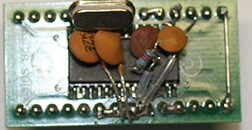
|
Re: A little HELP!!
Actually the zoom was already set at minimum.
Not played with colour oops sorry color!! but Never Twice Same Color sets have a HUE/TINT control that you can alter on the screen.
I now have worked out getting all lines on screen, it is combined with position and line characteristics. Removed the border area around the characters
Here are the values I have used to get the attached picture.
WDATA Values to be changed to values below
In init routine
'-------------------------------------------------------------
WDATA = %0001001100001111 ' was %0001 011111 001111
GOSUB Send ' Position ADDRESS 15 *****
'-------------------------------------------------------------
and in this
FOR ICOUNT = 0 TO 10
WDATA = %0001000010000001 '<<<<<$10c4 originally
' WDATA =%0001000010000111
GOSUB Send
NEXT ICOUNT
that should! sort the screen out.
Quick and dirty code to do screen fill as a subroutine - modified CLS routine
Run it with no external video input
This is where I put the call, once it has done the Xs it will not go further remeber to comment out GOSUB HEADER.
I put this at the very bottom of current code.Code:LOOPER: 'GOSUB HEADER ' LINE 3 RIGHT HAND SIDE TEST. GOSUB FILLSCREEN STOPHERE: GOTO STOPHERE
Code:'----------------------debug fills screen with X------------------ FILLSCREEN: 'character=$0B 'SPACE TEMP1=0 ' LINECOUNTER TEMP =0 'CHARCOUNTER loop2a: WDATA = 0 ' LINECOUNTER*256 + CHARCOUNTER ADDRESS GOSUB Send LOOP3a: ' :CHARACTERS 100011 WDATA = %0001011100100011 ' X CHARACTER GOSUB Send TEMP = TEMP + 1 IF TEMP >= 28 THEN TEMP = 0 TEMP1=TEMP1 + 1 ENDIF IF TEMP1 >= 11 THEN SCREENBLANKA GOTO LOOP3A SCREENBLANKA: RETURN
Last edited by aerostar; - 17th July 2017 at 12:39. Reason: added some info
|
Re: A little HELP!!
Had a play with colors -I found that reducing the drive in the MODE REGISTER, BIT M5, from 6dB to 0dB improved the colours, so M5 needs to be a 0, this will depend on how good the monitor is..
If you mofify the fillscreen to the following you should get lines of ifferent colors.
Code:FILLSCREEN: 'character=$0B 'SPACE TEMP1=0 ' LINECOUNTER TEMP =0 'CHARCOUNTER loop2a: WDATA = 0 ' LINECOUNTER*256 + CHARCOUNTER ADDRESS GOSUB Send LOOP3a: ' :CHARACTERS 100011 WDATA = %0001011100100011 ' X CHARACTER ' WDATA = %0001011101110111 ' if temp1 =0 then WDATA = %0001011101110111 if temp1 =1 then WDATA = %0001000001100011 if temp1 =2 then WDATA = %0001000101100011 if temp1 =3 then WDATA = %0001001001100011 if temp1 =4 then WDATA = %0001001101100011 if temp1 =5 then WDATA = %0001010001100011 if temp1 =6 then WDATA = %0001010101100011 if temp1 =7 then WDATA = %0001011001100011 if temp1 >=8 then WDATA = %0001011101100011 GOSUB Send TEMP = TEMP + 1 IF TEMP >= 28 THEN TEMP = 0 TEMP1=TEMP1 + 1 ENDIF IF TEMP1 >= 11 THEN SCREENBLANKA GOTO LOOP3A SCREENBLANKA: RETURN
|
Re: A little HELP!!
Wow! This is really so great! Thank you! I will try the above code just as soon as possible. I loved your screen full of "X's"! If I understand things correctly the text is as small as it can be? FYI, I work at Fox Television so a high quality professional monitor is not difficult to bring home. Did you like how I built the board with the chip? This display is something I have been dreaming about for several years now and it is so wonderful to finally see some light at the end of the tunnel! I also believe the research and development is a major contribution for all others!
Best, Ed
|
Re: A little HELP!!
Board looks great - There is still a demand for analogue OSD despite all the digital stuff around. The chips were hard to find after they had been discontinued, but your find of supplier seems to have lots still, price is good, Ebay prices .... silly.
What are you going to this it for ?, I am guessing at RC aeroplane or boat, video from it and motor speed from port and starboard propulsion units.
|
Re: A little HELP!!
Yes, you are right on! I have an RC submarine called a Typhoon just like the one in my avatar. My first pic project was an electronic compass as you cannot use GPS underwater. A representative from China was going to buy compasses from me and said my compass was too precision as it is accurate to 1/10 of one degree. They only wanted to pay for 1/2 of one degree accuracy. At one point it seemed they only wanted the design and software so I published the information thus putting it in the public domain. The sub has twin drive motors with temperature sensors mounted on the. There is also a roll and pitch sensor, angle sensors on the bow planes, stern planes and rudder. A sensor for speed and another for depth. There is a sensor for battery voltage and current draw. A laser pointer has been added to the "sail" for targeting. The periscope is 3 mm in diameter and about 2" long with a first surface mirror at the top sending picture down the tube through some acromat lenses then a dove prism lens to reverse the image left to right to avoid using a second mirror. Below the dove prism lens is a "snake camera" which is 3/4" square pointed up the periscope. Since it is a small size it is able to pan left and right. One of the larger challenges was being able to transmit video from underwater. With a "strange" antenna configuration video could be transmitted from a depth of 1 meter, possibly more as my Jacuzzi is only 1 meter deep. There are also torpedoes and missiles fueled by compressed air. Others had used Estes rocket motors until one guy fired a missile from his swimming pool, it broke surface tension, make a left turn, cleared the fence, when through a screened in patio, and set fire to a couch that his neighbor was taking a nap on! Since this, we have all gone to compress air. My torpedoes have an optional nose cone made from a foam paint brush soaked in water color the dried. When these torpedoes are fired they leave a small orange trail and a large orange dot on whatever it hits (like duck butts!) So there are a lot of features and sensors that would be great to display the readings of. Okay, that's the basics.
Best, Ed
|
Re: A little HELP!!
Must admit, I did not know about RC Subs, sounds great. Loved the bit about the guy and his rocket and neighbour !
|
Re: A little HELP!!
Glad you liked the story! Estes rocket motors generate their own oxygen therefore if you seal the nichrome with wax to make it waterproof you can fire the missile underwater! The wire does melt so you need a new wire for each firing. Some guys have even built exploding torpedoes which will actually sink plastic model surface ships or Skeedo Barbies! Lol Probably a silly question and I tried your color code and ended up with the first row of "X,s" and the remaining rows of just squares (no X's). Any idea what I could have done wrong?
Thanks, Ed
|
Re: A little HELP!!
Do not think you have done anything wrong. Have a look at the characters in the data sheet - 63H is 1100011
WDATA = %0001000001100011 is what I used, so change it to anything you want.
Try 77H 1110111 also change the page background back to blue if you have changed it - It seems that NTSC/STV is finicky with colours of characters and page background also play with brightness/contrast/colour/tint. I had similar problem until played with the monitor controls and characters.
change this line
if temp1 >=8
to
if temp1 =8 then WDATA = %0001011101100011
then add extra line
if temp1 >=9 then WDATA = %0001011100100011
This will/should give Xs on line 9
Untested but should! work
|
Re: A little HELP!!
Yes you are right! What I did wrong was try it with a video input signal! When you wrote "Blue Background" that was the key to not use a video input source. A video input source gives the rectangles in white only! Do you know if it can work with a video in source? Also how do I play with lines 6 and 7 to try and get a red red and not pink?
Thanks, Ed
|
Re: A little HELP!!
Data sheet says....
Mixed mode : the device is line locked to the
incoming CVBS signal. The text is superimposed
over the CVBS input either in B&W or translucent.
It may also be superimposed in color by using the
R/G/B outputs.
As it stands it switches to white characters on the incoming video.
I have not got a good red out of it, by playing with tint/color/contrast and brightness. If you did manage to get a decent red, that of course would impact on the color of the incoming video signals.
A black background MAY look better instead of blue, - the eye/brain can do funny things with colors.
|
Re: A little HELP!!
Thank you and does what you wrote mean we cannot have color characters over incoming video? Translucent should be fine if it has color.
|
Re: A little HELP!!
As far as I understand that data sheet statement, and of course I may be wrong, no colors over incoming video as well translucent unless you use RGB.
Never tried this, plain white was fine for what I used the chip for.
|
Re: A little HELP!!
That seems kind of strange to me. Any ideas as to how we can test this? Maybe something simple like assigning a color to "NTSC"?
|
Re: A little HELP!!
I have looked at the BOB4 from decade.net and it looks like their version only does white text on incoming video.
http://www.decadenet.com/bob4/bob4.html
I believe the STV chip was really designed for Menu setups on televisions etc, prior to digital sets, and does not to put color text overlays in incoming video, other chip maker versions also no colour, 1990-2000ish did the same, Maxim, Sanyo.
With digital sets it is now incorporated in a graphics chip onboard.
This is where you can change the character color, it will affect all characters using this routine, text and overlay.
DISPLAYCHAR:
WDATA = %0001010000000000 + STVCHAR
' 11 10 9 8 7654 3210
' WDATA = %0001 0 1 1 1 0000 0000 + STVCHAR
' bit 11 = character background 0 = disabled 1 = enabled
' bit 10 = red
' bit 09 = green
' bit 08 = blue
' 000 = black
' 001 = blue
' 010 = green
' 011 = cyan
' 100 = red
' 101 = magenta
' 110 = yellow
' 111 = white
|
Re: A little HELP!!
Again my biggest thanks. I will play with it as time permits. Yes I had looked at the BOB4 sometime ago and it was only white from what I remember.
Eagle Tree ( http://www.eagletreesystems.com/inde...product_id=136) does color text over video, however they would not share any information to customize their product for other purposes such as a sub. This is why I went back to the STV5730. I spent many hours and days searching for a chip to use with no success. Logically speaking, if you can add color text to a fixed color background then you had to generate the background color as well as the color text and "mix" them to produce video. RGB is kind of a strange animal as it can be RGB video and a separate sync or RGB with sync for each color (R-G-B). Maybe I was searching using the wrong search words and missed finding other chips?
|
Re: A little HELP!!
Hi Aerostar!
Somehow I screwed up my working file and now I have rows 1-9 as white squares while rows 10 and 11 are X's! I have done something stupid just not sure what after several days of trying!
Thanks, EdCode:'**************************************************************** '* Name : NTSC -RPM-V2 * '* Author : Ed Cannady * '* Notice : Copyright (c) 2017 * '* : All Rights Reserved * '* Date : 06-30-17 * '* Version : 1.0 * '* Notes : VIDEO IDENT * '* : WITH GREAT HELP FROM AEROSTAR * '**************************************************************** ' WORKS USES SYNC FOR SWITCHING BETWEEN MIXED AND FULL TEXT MODE ' GOING FROM VID IN TO TEXT AND BACK TO VID IN #CONFIG __config _HS_OSC & _WDT_ON & _MCLRE_ON & _LVP_OFF & _CP_OFF #ENDCONFIG '@ device PIC16F628A,HS_OSC,BOD_ON,MCLR_ON,PWRT_ON 'AEROSTAR SET UP define OSC 20 '--------------------------------------------------------------- '16f628a ED definitions TVSDA VAR PORTB.4 '0 OUTPUT to pin 11 of stv chip CS0 VAR PORTB.6 '0 OUTPUT to pin 13 of stv chip TVSCL VAR PORTB.5 '0 OUTPUT to pin 12 of stv chip SYNCH0 VAR PORTB.7 '1 INPUT to pin 7 of stv chip '--------------------------------------------------------------- ZOOMREG CON %0000000011001100 ' 12 ZOOM REGISTER COLREG CON %0000000011001101 ' 13 COLOUR REGISTER CONREG CON %0000000011001110 ' 14 CONTROL REGISTER POSREG CON %0000000011001111 ' 15 POSITION REGISTER MODEREG CON %0000000011010000 ' 16 MODE REGISTER ICOUNT VAR BYTE BITCOUNTER VAR BYTE WDATA VAR WORD CHARCOUNTER VAR BYTE LINECOUNTER VAR BYTE STVCHAR VAR BYTE ASCCHAR VAR BYTE CHARS VAR BYTE CHARS2 VAR BYTE TEMP VAR BYTE TEMP1 VAR BYTE COUNTER VAR BYTE PULSES VAR BYTE CURRENTMODE0 VAR BYTE PRPM VAR WORD '---------------------------------------------------------------- ' TOPLEFT CON 0 ' TOPMIDDLE CON 5 ' TOPRIGHT CON 10 ' BOTLEFT CON 2560 '10*256 ' BOTMIDDLE CON 2565 '(10*256)+ 5 ' BOTRIGHT CON 2570 '(10*256)+ 10 '---------------------------------------------------------------- DATA @0,"NTSC.",$FF,"NO SYNCHS RECEIVED",$FF TRISB = %10001111 '---------------------------------------------------------------- PAUSE 500 GOSUB Init PAUSE 500 GOSUB Init CURRENTMODE0=255 ' FORCES TRYSYNCHS TO SET MODE FIRST TIME Demo: CHARCOUNTER = 0 LINECOUNTER = 0 ' CURRENTMODE0 = 0 '0 = MIXED 1 = TEXT gosub CLS GOSUB TRYSYNCHS '================================== TEMP = 0 LOOPER: GOSUB HEADER ' LINE 3 RIGHT HAND SIDE TEST. GOSUB FILLSCREEN STOPHERE: GOTO STOPHERE ' PRPM = 6789 ' IF CURRENTMODE0=0 THEN ' ONLY WHEN INCOMING VIDEO SIGNAL ' GOSUB HEADER ' LINE 3 RIGHT HAND SIDE TEST. ' ENDIF ' IF CURRENTMODE0=1 THEN ' GOSUB NOVIDEO ' DISPLAYS NO VIDEO IF NO INCOMING SYNCHS ' ENDIF GOSUB TRYSYNCHS '=========================== ' PAUSE 500 'I/2 SECOND DELAY ' TOGGLE HEARTBEAT ' LED GOTO LOOPER 'DO IT FOREVER DISPLAYCHAR: WDATA = %0001011100000000 + STVCHAR ' 11 10 9 8 7654 3210 ' WDATA = %0001 0 1 1 1 0000 0000 + STVCHAR ' bit 11 = character background 0 = disabled 1 = enabled ' bit 10 = red ' bit 09 = green ' bit 08 = blue ' 000 = black ' 001 = blue ' 010 = green ' 011 = cyan ' 100 = red ' 101 = magenta ' 110 = yellow ' 111 = white ' bit 7 = blink 1=enable 0=disable GOSUB SEND RETURN SETLINE: WDATA = LINECOUNTER*256 + CHARCOUNTER GOSUB Send 'position cursor RETURN WasteTime: ' WORKS WITH LESS NOPS pauseus 20 ' was 20 nops RETURN StartCommunication: TVSCL = 1 'HIGH TVSCL GOSUB WasteTime CS0 = 0 'LOW CS0 GOSUB WasteTime TVSCL = 0 'LOW TVSCL GOSUB WasteTime RETURN StopCommunication: TVSCL = 1 'HIGH TVSCL GOSUB WasteTime CS0 = 1 'HIGH CS0 GOSUB WasteTime RETURN SendOne: TVSDA = 1 'HIGH TVSDA GOSUB WasteTime TVSCL = 0 'LOW TVSCL GOSUB WasteTime TVSCL = 1 'HIGH TVSCL GOSUB WasteTime RETURN SendZero: TVSDA = 0 'LOW TVSDA GOSUB WasteTime TVSCL = 0 ' LOW TVSCL GOSUB WasteTime TVSCL = 1 'HIGH TVSCL GOSUB WasteTime TVSDA = 1 'HIGH TVSDA GOSUB WasteTime RETURN OutByte: FOR BITCOUNTER = 1 TO 16 IF WDATA.15 = 1 THEN GOSUB SendOne ELSE GOSUB SendZero ENDIF WDATA = WDATA << 1 NEXT BITCOUNTER RETURN Send: GOSUB StartCommunication GOSUB OutByte GOSUB StopCommunication RETURN '------------------------------------------------------------- Init: ' PAUSE 50 added - seems to improve reliability of init TVSCL = 1 'HIGH TVSCL TVSDA = 1 'HIGH TVSDA CS0 = 1 'HIGH CS0 WDATA = $3000 '%110000 00000000 GOSUB Send ' Init STV5730 PAUSE 50 WDATA = $3000 GOSUB Send PAUSE 50 WDATA = $00DB '%00000000 11011011 GOSUB Send PAUSE 50 WDATA = $1000 '%00010000 00000000 GOSUB Send PAUSE 50 '------------------------------------------------------------- WDATA = %0000000011001100 GOSUB Send ' Init registers (point to register 12) PAUSE 50 '------------------------------------------------------------- WDATA = %0001000000000000 'NORMAL ' WDATA = %0001000011110000 '4 PIXELS HORIZ AND VERT GOSUB Send ' Zoom ADDRESS 12 PAUSE 50 '------------------------------------------------------------- WDATA = %0001001000000000 ' WDATA = %0001001000000100 GOSUB Send ' Color ADDRESS 13 PAUSE 50 '-------------------------------------------------------- WDATA= %0001101011010100 'CHANGE BIT 0 TO 1 FOR TEXT ONLY GOSUB Send ' Control ADDRESS 14 '------------------------------------------------------------- WDATA = %0001001100001111 ' was WDATA = %0001 0111 1100 1111 GOSUB Send ' Position ADDRESS 15 '------------------------------------------------------------- WDATA = %0001000100101110 '$183E BIT 11 CHANGED TO 0 M4 = 0 GOSUB Send ' Mode ADDRESS 16 %0001100000111110 '------------------------------------------------------------- WDATA = $00C0 '%00000000 11000000 GOSUB Send ' Set row attributes FOR ICOUNT = 0 TO 10 WDATA = %0001000010000001 '%00010000 11000100 was $10C4 ' WDATA =%0001000010000111 GOSUB Send NEXT ICOUNT RETURN CLS: 'character=$0B 'SPACE TEMP1=0 ' LINECOUNTER TEMP =0 'CHARCOUNTER loop2: WDATA = 0 ' LINECOUNTER*256 + CHARCOUNTER ADDRESS GOSUB Send LOOP3: ' :CHARACTERS WDATA = %0001011100001011 ' 1011 0BH SPACECHARACTER GOSUB Send TEMP = TEMP + 1 IF TEMP >= 28 THEN TEMP = 0 TEMP1=TEMP1 + 1 ENDIF IF TEMP1 >= 11 THEN SCREENBLANK GOTO LOOP3 SCREENBLANK: RETURN GETSTVCHAR: 'CONVERT ASCII TO STV STVCHAR =$7F ' FORCES CLOCK PICTURE IF ERROR LOOKDOWN ASCCHAR,["0123456789- ABCDEFGHIJKLMNOPQRSTUVWXYZ:./'abcdefghijklmnopqrstuvwxyz"],STVCHAR RETURN HEADER: LINECOUNTER=0 'SET START POSITION CHARCOUNTER=1 'SET CURSOR POSITION GOSUB SETLINE FOR CHARS2=0 TO 4 READ CHARS2, ASCCHAR gosub GETSTVCHAR 'CONVERT ASCII TO STV GOSUB DISPLAYCHAR NEXT LINECOUNTER=10 'SET START POSITION CHARCOUNTER=1 'SET CURSOR POSITION GOSUB SETLINE ASCCHAR = "P" gosub GETSTVCHAR 'CONVERT ASCII TO STV GOSUB DISPLAYCHAR ASCCHAR = "R" gosub GETSTVCHAR 'CONVERT ASCII TO STV GOSUB DISPLAYCHAR ASCCHAR = "P" gosub GETSTVCHAR 'CONVERT ASCII TO STV GOSUB DISPLAYCHAR ASCCHAR = "M" gosub GETSTVCHAR 'CONVERT ASCII TO STV GOSUB DISPLAYCHAR ASCCHAR = " " gosub GETSTVCHAR 'CONVERT ASCII TO STV GOSUB DISPLAYCHAR STVCHAR = PRPM DIG 3 '****** DIG VALUES ONLY GOSUB DISPLAYCHAR 'NEEDS TO BE STVCHAR !! STVCHAR = PRPM DIG 2 GOSUB DISPLAYCHAR STVCHAR = PRPM DIG 1 GOSUB DISPLAYCHAR STVCHAR = PRPM DIG 0 GOSUB DISPLAYCHAR RETURN NOVIDEO: LINECOUNTER=5 'SET START POSITION CHARCOUNTER=4 'SET CURSOR POSITION GOSUB SETLINE FOR CHARS2=6 TO 23 ' FROM EEPROM DATA READ CHARS2, ASCCHAR gosub GETSTVCHAR 'CONVERT ASCII TO STV GOSUB DISPLAYCHAR NEXT RETURN TRYSYNCHS: PULSES=0 COUNT SYNCH0,4,PULSES '3MS SHOULD COUNT TO 2 OR 3 IF PULSES > 0 THEN MIXED0 FULL0: IF CURRENTMODE0=1 THEN RETURN WDATA= %0000000011001110 'CONTROL REGISTER GOSUB SEND WDATA= %0001101011010101 'CHANGE BIT 0 TO 1 FOR TEXT ONLY OTIGINAL ' WDATA= %0001101111010100 'CHANGE BIT 0 TO 1 FOR TEXT ONLY GOSUB SEND STAYHERE02: CURRENTMODE0=1 GOSUB CLS GOBACK0: RETURN MIXED0: IF CURRENTMODE0=0 THEN RETURN WDATA= %0000000011001110 'CONTROL REGISTER GOSUB SEND WDATA= %0001101011010100 GOSUB SEND STAYHERE01: CURRENTMODE0=0 GOSUB CLS RETURN '----------------------debug fills screen with X------------------ FILLSCREEN: 'character=$0B 'SPACE TEMP1=0 ' LINECOUNTER TEMP =0 'CHARCOUNTER loop2a: WDATA = 0 ' LINECOUNTER*256 + CHARCOUNTER ADDRESS GOSUB Send LOOP3a: ' :CHARACTERS 100011 WDATA = %0001011101100011 ' X CHARACTER ' WDATA = %0001011101110111 ' if temp1 =0 then WDATA = %0001011101110111 if temp1 =1 then WDATA = %0001000001100011 if temp1 =2 then WDATA = %0001000101100011 if temp1 =3 then WDATA = %0001001001100011 if temp1 =4 then WDATA = %0001001101100011 if temp1 =5 then WDATA = %0001010001100011 if temp1 =6 then WDATA = %0001010101100011 if temp1 =7 then WDATA = %0001011001100011 if temp1 =8 then WDATA = %0001011101100011 if temp1 >=9 then WDATA = %0001011100100011 GOSUB Send TEMP = TEMP + 1 IF TEMP >= 28 THEN TEMP = 0 TEMP1=TEMP1 + 1 ENDIF IF TEMP1 >= 11 THEN SCREENBLANKA GOTO LOOP3A SCREENBLANKA: RETURN
|
Re: A little HELP!!
rows 1-9 as white squares while rows 10 and 11 are X's
if temp1 =8 then WDATA = %0001011101100011 = white square
if temp1 >=9 then WDATA = %0001011100100011 = X
Also remember rows are 0-10 not 1 - 11
|
Re: A little HELP!!
Thanks Aerostar,
Just another brain cramp on my part. As long as the background is blue then color squares appear. With video, only white squares. I keep searching the internet for a chip that will produce color with a video input and not a generated background. I cannot believe no one has or makes such a chip!
Best, Ed
 Members who have read this thread : 1
You do not have permission to view the list of names.
 Posting Permissions
Bookmarks