


I meant at least the first few lines until LOADER define.


 |
|

 Re: Issues with a bootloader
I meant at least the first few lines until LOADER define.
|
Re: Issues with a bootloader
Malc,
After you use the boot loader to load your hex file and then the boot loader can no longer see the PIC, why don't you use you PIC programmer to read the PIC back to a file. You can the disassemble it and look at the the first 8 instructions. You might be able to see what is happening that way.
If you need help let me know.
Regards,
TABSoft
 |
Re: Issues with a bootloader
|
Re: Issues with a bootloader
Ok I'm missing the basics - do you have to amend the main code to include a statement to look at the bootloader ?
Here's the first few lines of the main program code as requested
Code:INCLUDE "Hardwr_4580.pbp" DEFINE WRITE_INT 1 INCLUDE "DT_INTS-18.bas" ; Base Interrupt System include "AM2302_LIB_v024.bas" ASM INT_LIST macro ; IntSource, Label, Type, ResetFlag? INT_Handler TMR1_INT, HeaterDrive, ASM, yes endm INT_CREATE ; Creates the interrupt processor ENDASM T1CON = %00000001 ; free-running, 1:1 prescaler @ INT_ENABLE TMR1_INT ; enable Timer1 interrupts ENABLE DEBUG ;----[DS1820 Options]----Value----Default----------------------------------- DEFINE DS1820_DECIMALS 1 ' 1 DEFINE DS1820_VERIFYCRC YES ' NO DEFINE DS18B20_ONLY YES ' NO INCLUDE "DT18x20.pbp" ' Include DT18x20 module ;----[Analog Settings]------------------------------------------------------ INCLUDE "alldigital.pbp" ;----[PID multi-channel]---------------------------------------------------- PID_Channels CON 4 INCLUDE "incPID_mc.pbp" ' Include the multi-channel PID routine. ;----[Port settings]---------------------------------------------------- TRISA = %11001111 TRISB = %00000000 TRISD = %00001111 CMCON = 7 ' disable Comparators ADCON1 = $0F ' %0000 1111 AN2=VSS, AN3=VDD, AN12-0 = Digital ADCON2 = $00 ' %0000 0000 ;----[AM2302 ]---------------------------------------------------------- AM2302_MAX_SENSORS con 4 ' Number of Sensors Used ;----[USART defines]-------------------------------------------------------- DEFINE HSER_RCSTA 90h ' Enable serial port & continuous receive DEFINE HSER_TXSTA 24h ' Enable transmit, BRGH = 1 DEFINE HSER_CLROERR 1 ' Clear overflow automatically DEFINE HSER_SPBRG 86 ' 115200 Baud @ SPBRGH = 0 BAUDCON.3 = 1 ' Enable 16 bit baudrate generator RCSTA = $90 ' Enable serial port & continuous receive TXSTA = $24 ' Enable transmit, BRGH = 1 SPBRG = 86 ' 115200 Baud @ -0.22% SPBRGH = 0 BAUDCON.3 = 1 ' Enable 16 bit baudrate generator
|
Re: Issues with a bootloader
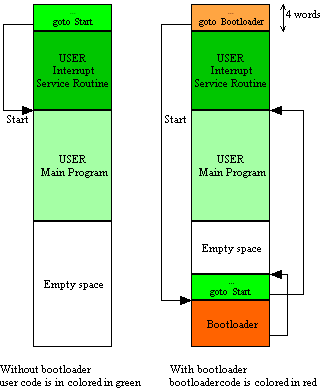
I wiped the PIC and loaded the bootloader, read back a screen dump and showed FF for all blocks apart from the 1st four. The PC app fond the pic and uploaded the main code - You can see that the first 4 blocks remained the same so I'm guessing it didn't overwrite the bootloader (see the diagram attached)
My PicFlash application has tick boxes for code protect sections of PIC memory - is it worth enabling this for 0x00 ??
Sorry guys the forum resizes the image - here's a link to the full sized one http://www.micro-heli.co.uk/screendump.png
|
Re: Issues with a bootloader
Scampy,
Try addingAnd see if that makes it any better.Code:DEFINE LOADER_USED 1
/Henrik.
|
Re: Issues with a bootloader
Surely a boot loader can’t be written in a few instructions...
Have you scrolled right down the bottom of your hex file when only the boot loader is loaded?
I think it would be written to the last locations it could fit.
|
Re: Issues with a bootloader
Art, I think the bootloader contains the "goto" section at the start, and then the actual loader is at the end of the code space as shown below and confirmed in the attachment.
@Henrik, Line added to the main code - thanks
|
Re: Issues with a bootloader
It's still flakey, but seems to work 8 out of 10 times !
Cheers guys
|
Re: Issues with a bootloader
If the boot loader can write your program over serial the pic must support program memory read/write.
So you should be able to check if the loader exists with your own pic program.
If you think you're overwriting it with your program you'd only need to check the first word is correct.
Code:pword var word index var word index = $7F40 LCDOUT ... clear screen and home command READCODE index,pword IF pword = $700E THEN LCDOUT “ Loader exists " ELSE LCDOUT “Loader Overwrite" ENDIF
Last edited by Art; - 15th May 2015 at 00:48.
 Members who have read this thread : 0
You do not have permission to view the list of names.
 Posting Permissions

Bookmarks