Rfid mfrc522


Closed Thread
Results 1 to 20 of 20

Thread: Rfid mfrc522

Hybrid View

  1. #1
    Join Date
    Aug 2006
    Location
    SWITZERLAND (french speaking)
    Posts
    946


    Did you find this post helpful? Yes | No

    Default let's try to make it work....

    Hi,

    I might need a little help here - I'm stuck for hours now.

    It's the first time for me to use this RFID module and it is giving me some headache.

    For a test, I want to read the first three bytes of the tag's ID and print them serially out.

    But up to now, I can't make the RFID module "read" something. I'm not sure about my connections and about the different timings and whatever I have to do to "start" the read process.Name:  2017-10-07-Serial Communicator.jpg
Views: 4152
Size:  51.0 KB

    Does anyone have a good idea to get me started reading some data?

    My test project:
    Name:  K640_20171007_172516.JPG
Views: 4356
Size:  121.9 KB

    The RFID module I'm using is this one for ARDUINO and the connections I used:
    Name:  K640_RC522.JPG
Views: 7180
Size:  28.3 KB

    Here's is my current code:
    Code:
    ' ====== FUSES =====================================================================================
    ' PIC 16F690 Fuses (MPASM)
    @ __config _FCMEN_OFF &_IESO_OFF &_CPD_OFF &_WDT_OFF &_HS_OSC &_BOR_OFF &_CP_OFF &_PWRTE_OFF &_MCLRE_OFF
    
    ' ====== REGISTERS =================================================================================
    '             76543210
    OPTION_REG = %10000000 ' Pull-Ups OFF
    OSCCON     = %00000000 ' Internal RC
    ANSEL      = %00000000 ' Select analog inputs Channels 0 to 7
    ANSELH     = %00000000 ' Select analog inputs Channels 8 to 11
    WPUA       = %00000000 ' Select weak pull-ups
    WPUB       = %00000000 ' Select weak pull-ups
    ADCON0     = %00000000 ' Select the VP6 channel as ADC input bits5:2 (xx1101xx)
    ADCON1     = %00000000 ' Set FRC
    VRCON      = %00000000 ' VP6 reference
    CM1CON0    = %00000000 ' Comparator1 Module
    CM2CON0    = %00000000 ' Comparator2 Module
    INTCON     = %00000000 ' INTerrupts CONtrol; GIE=1, T0IE=1
    TRISA      = %00000000 ' Select Input/Output (0 to 5)
    PORTA      = %00000000 ' Set High/Low (0 to 5)
    TRISB      = %00000000 ' Select Input/Output (4 to 7)
    PORTB      = %00100000 ' Set High/Low (4 to 7)
    TRISC      = %00000000 ' Select Input/Output (0 to 7)
    PORTC      = %00000000 ' Set High/Low (0 to 7)
    
    ' ====== DEFINES ===================================================================================
    define OSC 4
    
    ' ====== VARIABLES & CONSTANTS =====================================================================
    SPI_SCK     Var PORTB.4 ' SCK (SPI Clock)
    SPI_MISO    Var PORTB.5 ' MISO (master In, Slave Out)
    SPI_NSS     VAR PORTB.6 ' "NOT" Slave Select (SDA pin of module RC522)
    LED         var PORTB.7
    Serial_Out  VAR PORTC.7
    
    SPI_Mode    var byte
    RFIDData    Var byte(10)
    Serial_Bdr  VAR word
    Counter     var word
    
    ' ====== INITIALIZE ================================================================================
    INIT:
    Serial_Out  = 1 ' to avoid garbage serial data
    Counter     = 0
    SPI_NSS     = 1
    SPI_Mode    = 0 ' MSBPRE
    RFIDData    = 0
    Serial_Bdr  = 84 '9600DTN
    
    ' ====== PROGRAM ===================================================================================
    MAIN:
        ' Read RFID tag
        SPI_NSS = 0 ' select the RFID reader
        PAUSEus 50
        Shiftin SPI_MISO, SPI_SCK, SPI_Mode, [RFIDData(0),RFIDData(1),RFIDData(2)]
        SPI_NSS = 1 ' deselect the RFID reader
        
        ' Printout RFID data
        Counter = Counter + 1
        serout2 Serial_Out, Serial_Bdr,[DEC5(Counter), " ",DEC(RFIDData[0]),DEC(RFIDData[1]),DEC(RFIDData[2]),13,10]
        
        ' Alive witness
        TOGGLE LED 
        
        Pause 500
        Goto main:
     
    End
    
    '======= CIRCUITRY =================================================================================
    'PORTA.0[19] ICSPDAT                  VDD >01-20< VSS/GND
    'PORTA.1[18] ICSPCLK             OSC1/RA5 |02-19| RA0/AN0/DAT
    'PORTA.2[17]                 AN3/OSC2/RA4 |03-18| RA1/AN1/CLK
    'PORTA.3[04] MCLR                MCLR/RA3 >04-17| RA2/AN2
    'PORTA.4[03] OSC2 - Xtal         CCP1/RC5 |05-16| RC0/AN4
    'PORTA.5[02] OSC1 - Xtal          P1B/RC4 |06-15| RC1/AN5
    '                             AN7/P1C/RC3 |07-14| RC2/AN6
    'PORTB.4[13] SPI_SCK              AN8/RC6 |08-13| RB4/AN10
    'PORTB.5[12] SPI_MISO             AN9/RC7 |09-12| RB5/AN11
    'PORTB.6[11] SPI_NSS                  RB7 |10-11| RB6
    'PORTB.7[10] LED
    '
    'PORTC.0[16]
    'PORTC.1[15]
    'PORTC.2[14]
    'PORTC.3[07]
    'PORTC.4[06]
    'PORTC.5[05]
    'PORTC.6[08]
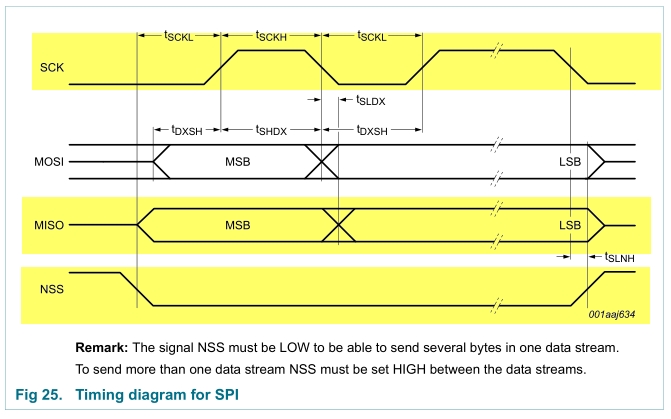
    Name:  SPI theory.jpg
Views: 4464
Size:  253.3 KB

    Name:  SPI Timing.jpg
Views: 4831
Size:  109.5 KB
    Roger

  2. #2
    Join Date
    Oct 2005
    Location
    Sweden
    Posts
    3,624


    Did you find this post helpful? Yes | No

    Default Re: Rfid mfrc522

    Hi Roger,
    I'm confused, where do you see that shifiting in three bytes like that should give you the three first byte of a cards S/N number?

    It looks to me as if the RFID reader chip implements a "proper" SPI slave meaning you have to shift data out at the same time as you shift data in. If that's the case SHIFTIN/SHIFTOUT won't work because it can only shift data out OR shift data in, it can't do it simultanously.

    /Henrik.

  3. #3
    Join Date
    Aug 2006
    Location
    SWITZERLAND (french speaking)
    Posts
    946


    Did you find this post helpful? Yes | No

    Default So, where to start?

    Henrik,

    I'm confused, where do you see that shifiting in three bytes like that should give you the three first byte of a cards S/N number?
    That's the point; I'm maybe even more confused than you are

    Honestly, I don't know how to handle the card reader so I need some "theory" on how it works so I will be able to start thinking the right way.
    Roger

  4. #4
    Join Date
    May 2013
    Location
    australia
    Posts
    2,690


    Did you find this post helpful? Yes | No

    Default Re: Rfid mfrc522

    Here's a start. it reads and writes to the mfrc522.registers using the ssp module
    I have made a demo for a 16f690 that loads up the regs [settings like in the Arduino demos ]
    and reads them back. that bit is easy
    I have not discovered how to read a card yet, the Arduino and python libs I have tried to
    digest have code that's so obscure it leave me cold .

    Arduino seems to poll CommIrqReg looking for a value of 0x45 [I think] but I have same regs set
    but the card seems to be ignored , I'm just guessing how it works the reg never changes for me

    reg printout for regs 1 to 3f
    01,20 02,80 03,00 04,15 05,00 06,00 07,21 08,00
    09,00 0A,00 0B,08 0C,10 0D,00 0E,A0 0F,00
    10,00 11,3D 12,00 13,00 14,83 15,40 16,10
    17,84 18,84 19,4D 1A,00 1B,00 1C,62 1D,00
    1E,00 1F,EB 20,00 21,FF 22,FF 23,88 24,26
    25,87 26,48 27,88 28,20 29,20 2A,8D 2B,A9
    2C,00 2D,E8 2E,00 2F,00 30,00 31,00 32,00
    33,80 34,00 35,00 36,40 37,92 38,00 39,00
    3A,00 3B,88 3C,FF 3D,00 3E,03 3F,00
    Attached Files Attached Files
    Warning I'm not a teacher

  5. #5
    Join Date
    Oct 2005
    Location
    Sweden
    Posts
    3,624


    Did you find this post helpful? Yes | No

    Default Re: Rfid mfrc522

    Yeah, what we're dealing with here is not the interface to a "RFID-reader" but to the complete "RFID-radio". I have not looked at any example code for other platforms but I would expect it to be a fairly complicated setup procedure, configuring all the registers etc - and even more so KNOWING what to configure them with. And when Richard says HE cringes when looking at the code for it I don't think I'll even bother :-)

    There are readers available implementing both the "radio" and a microcontroller giving you an interface to "just" the card and not the complete "radio" tranceiver - much easier but a bit more expensive. One example is the OEM/MIFARE ICODE board from IBTechnology (datasheet) which I've personally used with success.

  6. #6
    Join Date
    Aug 2006
    Location
    SWITZERLAND (french speaking)
    Posts
    946


    Did you find this post helpful? Yes | No

    Default lets's make it a bit more simple...

    Quote Originally Posted by richard View Post
    Here's a start.
    Thanks a lot Richard. But as you say, this is only a part of the problem...

    Since I don't need nor want to go for rocket science, I'll take Henrik's advice and find a "plug'n play" reader
    Roger

  7. #7
    Join Date
    Aug 2006
    Location
    SWITZERLAND (french speaking)
    Posts
    946


    Did you find this post helpful? Yes | No

    Default Re: Rfid mfrc522

    Quote Originally Posted by HenrikOlsson View Post
    ...the OEM/MIFARE ICODE board from IBTechnology which I've personally used with success.
    Hi Henrik,

    I received my reader from IBTechnology a few days ago and I'm still stuck with even reading a tag. I must be overseeing something basic

    Would you have snippet of code or even just some serial commands as a start for me please?
    Roger

  8. #8
    Join Date
    Oct 2005
    Location
    Sweden
    Posts
    3,624


    Did you find this post helpful? Yes | No

    Default Re: Rfid mfrc522

    I got payed to do that project so I'm afraid I can't just give the code away here.

    What have you tried? Post some code, I or someone else might see what you're doing wrong.

    As with any project, start small, get the basics going and build on it but try to think ahead.
    If you think you're going to do this without reading the datasheet back to front a couple of times - think again.

    I used SEROUT2/SERIN2 to communicate with the reader and HSEROUT/HSERIN to communicate with the PC.

    You need to poll the CTS signal of the board to know when it's able to receive commands. So these are the very basics:
    1) Wait for the CTS signal to high (board busy looking for a card)
    2) Wait for the CTS signal to go low (board ready to receive serial data from the PIC)
    3) Send the "return card status command" ($53)
    4) Receive the card status byte from the reader.

    Each bit in the Status byte indicates different things. See the datasheet!
    If, for example, bit 2 is set then there's a card "on" the reader and you can then read the Unique Identifier

    5) Wait for the CTS signal to high (board busy looking for a card)
    6) Wait for the CTS signal to go low (board ready to receive serial data from the PIC)
    7) Send the "read UID command" ($55)
    8) Recieve 8 bytes depending on card type. First byte is status then comes the UID.

    That's the basics. I highly recommend you get the first part going first. Make sure you can poll the reader and output the Status byte to the PC so you can SEE what it's doing - then move on.

    /Henrik.

Similar Threads

  1. RFID with PIC
    By aloon15 in forum General
    Replies: 0
    Last Post: - 23rd September 2014, 19:33
  2. RFID Issues.... HELP !!!!!
    By andybarrett1 in forum mel PIC BASIC Pro
    Replies: 19
    Last Post: - 11th September 2014, 11:00
  3. RFID example.
    By StevenLim in forum General
    Replies: 2
    Last Post: - 8th February 2011, 10:08
  4. Rfid?
    By toalan in forum Off Topic
    Replies: 0
    Last Post: - 12th February 2005, 00:37
  5. RFid reader
    By paul farrugia in forum mel PIC BASIC Pro
    Replies: 0
    Last Post: - 14th January 2005, 21:27

Members who have read this thread : 0

You do not have permission to view the list of names.

Posting Permissions

  • You may not post new threads
  • You may not post replies
  • You may not post attachments
  • You may not edit your posts