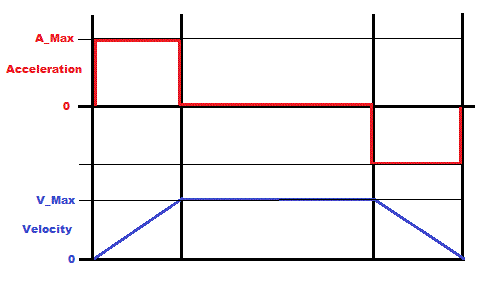
Motion profile generator.


Closed Thread
Results 1 to 40 of 56

Hybrid View

  1. #1
    Join Date
    May 2008
    Location
    Italy
    Posts
    825


    Did you find this post helpful? Yes | No

    Default Re: Motion profile generator.

    Surely I will say something obvious, but since I did not noticed it in the above post, let me say it.

    When the travel distance is less than twice the accelleration the trapezoidal profile become triangular and V max decrease, so that Vmax = tan(accelleration Slope) time the travel distance / 2

    Cheers

    Al.
    All progress began with an idea

  2. #2
    Join Date
    Jul 2003
    Location
    Colorado Springs
    Posts
    4,959


    Did you find this post helpful? Yes | No

    Default Re: Motion profile generator.

    Here's what I'm up against ...

    You can only adjust the acceleration.
    I don't see any way to know what acceleration is required to make the half-way point end up exactly at an interrupt period.
    It always ends up somewhere in the middle of a period.

    If I new what the velocity would be at the halfway point, I could adjust the acceleration so it reaches the half-way point at exactly an interrupt period.
    Except that since the acceleration changed, it won't be at that velocity at the half-way point anymore.
    So I don't see any way of predicting the half-way point in order to use the same deceleration slope it uses for acceleration (the yellow line).

    I can only change the acceleration at specific times, which coincide with the interrupt periods.
    So if I recalculate the deceleration slope at period 6 before it reaches the half-way point, it creates the green line, which should end up at the target perfectly.

    If I were to recalculate it after passing the half-way point, the deceleration rate would be higher, and violate the A_Max constraint.

    The blue line is the overshooting profile, with it's velocity using the left axis.
    The red line is the position, using the right axis.
    The parameters for that run were ... A_Max=10, V_Max=100, Target=475.


    I'm doing the green line.
    But since the green line is actually a slower velocity, it will take longer than shown in the chart to reach the target.
    But at least it is calculatable.
    DT

  3. #3
    Join Date
    Apr 2011
    Location
    Kent, UK
    Posts
    52


    Did you find this post helpful? Yes | No

    Default Re: Motion profile generator.

    Quote Originally Posted by Darrel Taylor View Post
    You can only adjust the acceleration.
    I don't see any way to know what acceleration is required to make the half-way point end up exactly at an interrupt period.
    It always ends up somewhere in the middle of a period.
    Realistically, there will be thousands of intervals, the error will be tiny. We use an interval of 2mS and get a QC count of 1 at 15 RPM to 680 at 10,000 RPM. (using a 512 line encoded motor)
    I would suggest to leave the acceleration at the demand rate, and work out when to stop accelerating and run at a constant speed or to decelerate in time to hit the target.

  4. #4
    Join Date
    Jul 2003
    Location
    Colorado Springs
    Posts
    4,959


    Did you find this post helpful? Yes | No

    Default Re: Motion profile generator.

    Timmers,

    You are talking about the control that Henrik is using. I'm sure the intervals are much smaller, and it includes a PID loop with an encoder feedback.
    My task is to generate a "Profile" for that control to follow. A much different situation.
    DT

  5. #5
    Join Date
    Jul 2003
    Location
    Colorado Springs
    Posts
    4,959


    Did you find this post helpful? Yes | No

    Default Re: Motion profile generator.

    Henrik,

    I think i have it all working now.
    It's really ugly and needs to be cleaned up.

    But before I do that tomorrow, I have one last question.
    Would adding an "Ease From" and "Ease To" function to the beginning and end of the profile suffice for the 3rd order curve thought?
    DT

  6. #6
    Join Date
    Oct 2005
    Location
    Sweden
    Posts
    3,624


    Did you find this post helpful? Yes | No

    Default Re: Motion profile generator.

    Hi guys,

    First of all, for clarity:
    The PID-loop is already in place. It servos the motor to the position given to it and does whatever it can to bring the motor to the commanded based P,I,D and feedforward parameters. If the error between the target position and actual position gets above a setable limit the loop faults and aborts. This is one of the reasons for needing the profile generator - I can't just ask the PID-loop to move the motor 10000 QCs (quadrature counts or steps or pulses or units or whatever we want to call it) because if I do an error of an equal amount (10000) will instantly develop and the loop will fault. Even if such large errors was allowed the resulting move would be less then optimal.

    The profile generators job, being discussed here, is to generate input TO the PID-loop which the motor and load is actually capable of following.
    The input to the profile generator can then be "stepped" 10000 QCs. It then will generate a velocity profile with the parameters given to it. Each "tick" the profile generator will give the PID-loop a new position for it to move the motor to during the next time interval. The PID-loop is executed between 500 and 2500 times per second and so will the profile generator. At least that's the idea.

    Darrel,
    Although I'm having some difficulties figuring out what the worst case scenario could be with the "green line approach" I don't think doing it that way should be any problem in real life. It's better to "stretch" the deceleration phase than to violate A_Max although I would prefer it symetrical but I get what you're saying - I think.

    Thanks!
    /Henrik.

  7. #7
    Join Date
    Oct 2005
    Location
    Sweden
    Posts
    3,624


    Did you find this post helpful? Yes | No

    Default Re: Motion profile generator.

    Darrel,
    Missed your last post while composing mine.
    You mean like a initial "step" (or steps) at a velocity less than A_Max, just to "break the edge" on the trapetzoidal/triangular profile? (If not, could you clarify?)

    That could help, ideally it should be at all four "corners" of the profile but having it at the start and end of the move is certainly better than nothing.

    Thanks again Darrel!
    /Henrik.

  8. #8
    Join Date
    Jul 2003
    Location
    Colorado Springs
    Posts
    4,959


    Did you find this post helpful? Yes | No

    Default Re: Motion profile generator.

    Ok Henrik, here's what I came up with.

    To start a movement, set the three variables and call the ProfileStart subroutine.

    Code:
    MaxAcceleration = 10     ; starting values
    MaxVelocity     = 100
    TargetPosition  = 2000
    GOSUB ProfileStart
    Then for each period, call the ProfileStep subroutine, and the variables ... ThisAccel, Velocity and Position will be updated.
    When the TargetPosition has been reached, the ProfileComplete flag will be set.

    For the above values, the output of the test program looks like this ...
    Like your original example, the first column is Acceleration change, second column Velocity, third column Position.
    Code:
    1 = Edit MaxAcceleration (10)
    2 = Edit MaxVelocity     (100)
    3 = Edit TargetPosition  (2000)
    Enter = GO
    >
    
       0       0       0   
      10      10      10   
      10      20      30   
      10      30      60   
      10      40     100   
      10      50     150   
      10      60     210   
      10      70     280   
      10      80     360   
      10      90     450   
      10     100     550   
       0     100     650   
       0     100     750   
       0     100     850   
       0     100     950   
       0     100    1050   
       0     100    1150   
       0     100    1250   
       0     100    1350   
       0     100    1450   
       0     100    1550   
     -10      90    1640   
     -10      80    1720   
     -10      70    1790   
     -10      60    1850   
     -10      50    1900   
     -10      40    1940   
     -10      30    1970   
     -10      20    1990   
     -10      10    2000   
     -10       0    2000   
    
    1 = Edit MaxAcceleration (10)
    2 = Edit MaxVelocity     (100)
    3 = Edit TargetPosition  (2000)
    Enter = GO
    >
    I quickly tried the "Ease From" and "Ease To", but it messed up the final position so i pulled it back out.
    I'll have to think about it some more.

    The MaxAcceleration variable will get changed on small moves.
    So you should keep a separate variable and copy it to MaxAcceleration before starting a profile.

    Hopefully, this is somewhere close to what you were looking for.
    Try the test program, and as many combinations of the settings as you can first.
    I'd hate to ruin your CNC.

    If you can follow the code in the include file, and it makes sense ...
    You should see a psychiatrist as soon as possible.
    Attached Files Attached Files
    DT

  9. #9
    Join Date
    May 2013
    Location
    australia
    Posts
    2,705


    Did you find this post helpful? Yes | No

    Default Re: Motion profile generator.

    I found this article on setting and using the qei /pcpwm modules and incorporated it into my scheme ,its worth a look the qei.h and motor_pwm.h in particular.

    http://hades.mech.northwestern.edu/i...l_Port_Example

  10. #10
    Join Date
    Apr 2011
    Location
    Kent, UK
    Posts
    52


    Did you find this post helpful? Yes | No

    Default Re: Motion profile generator.

    It is all relative to time. One thing not concidered yet is what to do if the servo has not achieved the demand. Do you run the servo faster/slower (velocity), harder/softer rate of change (acceleration & deceleration), longer/shorter (time) or forwards/back (position) to achieve the end target?

    I assume you are attempting to modulate the velocity to achieve an end target at xx time whilst keeping the rate of change and max velocity within the set limits.

    If you concider a velocity/time graph (trapezoid shape), with velocity as the height of the perpendicular at the current time, then the distance to travel is the area under the graph from the current position. (see graph in post #1)
    The math to extract the velocity demand (in QC's / time period), at any given time, according to end target, defined limitations and servo error, is what you are trying to calculate.

    Am I helping?

  11. #11
    Join Date
    May 2013
    Location
    australia
    Posts
    2,705


    Did you find this post helpful? Yes | No

    Default Re: Motion profile generator.

    this works on the real servo motor. what a difference the qei module makes ,and 14 bit pwm seems much smoother
    pid rate now 1ms ramp rate 8ms with 49 steps , no attempt yet to handle short moves but long ones are good . fwd and backwards moves are good .
    pos counter 24bit / vmax and accel are fixed constants so far
    Attached Files Attached Files

  12. #12
    Join Date
    Oct 2005
    Location
    Sweden
    Posts
    3,624


    Did you find this post helpful? Yes | No

    Default Re: Motion profile generator.

    Hi Richard,
    I've actually made some progress myself too, just for fun I'm attaching a photo of my little testbed. It was designed a long time ago, at the time I was Little "afraid" of the PCPWM module so it's actually using the normal CCP module for the PWM output, 19.531kHz, 10bit resolution. What PWM frequency are you using to get 14bit with the PCPWM module?

    Name:  Testbed.jpg
Views: 1470
Size:  237.4 KB

    Anyway, my code seems to work pretty good in the real world too. PID-rate is 1220Hz (derived from the PWM time base, 1:16 postscale). Initially I tried to run the profile generator "slower" than the PID but it really didn't want to fly properly. Now it's updating at the same rate as the PID and it's working pretty good. The CPU load is pretty high during deceleration but I'm "only" running it at 20MHz on this board so at 40MHz it'll be more relaxed. Acceleration, velocity and distance can be set arbitrarily.

    Time is limited and motivation to work on it comes and go but I'll keep poking at it.

    /Henrik.

  13. #13
    Join Date
    May 2013
    Location
    australia
    Posts
    2,705


    Did you find this post helpful? Yes | No

    Default Re: Motion profile generator.

    yes noise is an issue for 14 bit its 1.8khz , much quieter at 16khz and 10 bit res fosc is 32mhz (8meg rock *4pll)

    I need to make a better test bed 600ma from the l293d is a bit limiting .

    got the pid routine under 500us worst case using floats . I find that floats are easier to work with (mentally) for experimenting with but will go back to ints when I have things sussed out.

    I'm not sure how I will go about implementing variable velocity or accel yet. I was just really happy to get " pid lock " and good position control to start with.

    ps using the microchip c floating point library adds 8k bytes to the pgm its huge
    Last edited by richard; - 18th October 2014 at 15:52.

Similar Threads

  1. Motion Capturing
    By koossa in forum Off Topic
    Replies: 0
    Last Post: - 30th June 2009, 12:05
  2. Suggest a motion sensor Please
    By sougata in forum mel PIC BASIC Pro
    Replies: 4
    Last Post: - 4th March 2007, 14:22
  3. Wireless Motion Sensors.
    By koossa in forum mel PIC BASIC Pro
    Replies: 9
    Last Post: - 17th October 2006, 22:57
  4. Need low Profile LCDs
    By Foxx373 in forum General
    Replies: 8
    Last Post: - 26th October 2005, 18:33
  5. Motion Tracking
    By JEC in forum mel PIC BASIC Pro
    Replies: 5
    Last Post: - 5th November 2004, 01:58

Members who have read this thread : 0

You do not have permission to view the list of names.

Posting Permissions

  • You may not post new threads
  • You may not post replies
  • You may not post attachments
  • You may not edit your posts