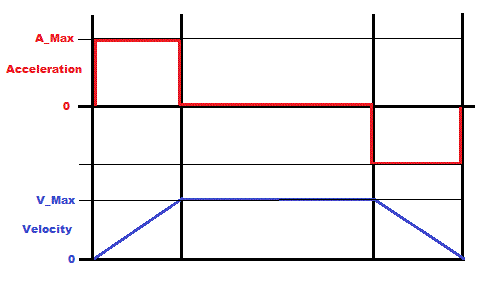
Motion profile generator.


Closed Thread
Results 1 to 40 of 56

Hybrid View

  1. #1
    Join Date
    Jul 2003
    Location
    Colorado Springs
    Posts
    4,959


    Did you find this post helpful? Yes | No

    Default Re: Motion profile generator.

    Well, I was thinking more of the decimal remainder than the modulas remainder.

    But in trying to recreate the code, I'm seeing some big limitations in the theory.
    The only way to end up at the exact Target Position, is to have a Position that is an exact multiple of V_Max.

    With V_Max = 100, you can only get target positions of 1800, 1900, 2000, 2100 etc.
    I would think you would want more precise targets ...

    Currently, I can get +/- 5 counts from those targets by using the decimal remainder idea.
    I think I can change it to reach any target position, but then I see more problems down the road.

    This only ramps from 0 to a target.
    It won't go from target to target.
    Unless there's some other steps in the process that I'm missing.

    Here's some output from the test program.
    If I can figure the rest out, I'll post the code.
    Code:
    1 = Edit Max_Acceleration (10)
    2 = Edit Max_Velocity     (100)
    3 = Edit TargetPosition   (2000)
    Enter = GO
    >
    
        0       0       0   
       10      10      10   
       10      20      30   
       10      30      60   
       10      40     100   
       10      50     150   
       10      60     210   
       10      70     280   
       10      80     360   
       10      90     450   
       10     100     550   
       10     100     650   
       10     100     750   
       10     100     850   
       10     100     950   
       10     100    1050   
       10     100    1150   
       10     100    1250   
       10     100    1350   
       10     100    1450   
       10     100    1550   
       10      90    1640   
       10      80    1720   
       10      70    1790   
       10      60    1850   
       10      50    1900   
       10      40    1940   
       10      30    1970   
       10      20    1990   
       10      10    2000   
       10       0    2000   
    
    1 = Edit Max_Acceleration (10)
    2 = Edit Max_Velocity     (100)
    3 = Edit TargetPosition   (2000)
    Enter = GO
    >1
    Enter new Max_Acceleration (10):15
    
    Max_Acceleration = 15
    
    1 = Edit Max_Acceleration (15)
    2 = Edit Max_Velocity     (100)
    3 = Edit TargetPosition   (2000)
    Enter = GO
    >
    
        0       0       0   
       14      14      14   
       14      28      42   
       14      42      84   
       14      57     141   
       14      71     212   
       14      85     297   
       14      99     396   
       14     100     496   
       14     100     596   
       14     100     696   
       14     100     796   
       14     100     896   
       14     100     996   
       14     100    1096   
       14     100    1196   
       14     100    1296   
       14     100    1396   
       14     100    1496   
       14     100    1596   
       14     100    1696   
       14      86    1782   
       14      72    1854   
       14      58    1912   
       14      43    1955   
       14      29    1984   
       14      15    1999   
       14       0    1999   
    
    1 = Edit Max_Acceleration (15)
    2 = Edit Max_Velocity     (100)
    3 = Edit TargetPosition   (2000)
    Enter = GO
    >3
    Enter new TargetPosition (2000):1800
    
    TargetPosition = 1800
    
    1 = Edit Max_Acceleration (15)
    2 = Edit Max_Velocity     (100)
    3 = Edit TargetPosition   (1800)
    Enter = GO
    >
    
        0       0       0   
       14      14      14   
       14      28      42   
       14      42      84   
       14      57     141   
       14      71     212   
       14      85     297   
       14      99     396   
       14     100     496   
       14     100     596   
       14     100     696   
       14     100     796   
       14     100     896   
       14     100     996   
       14     100    1096   
       14     100    1196   
       14     100    1296   
       14     100    1396   
       14     100    1496   
       14      86    1582   
       14      72    1654   
       14      57    1711   
       14      43    1754   
       14      29    1783   
       14      14    1797   
       14       0    1797   
    
    1 = Edit Max_Acceleration (15)
    2 = Edit Max_Velocity     (100)
    3 = Edit TargetPosition   (1800)
    Enter = GO
    >2
    Enter new Max_Velocity (100):90
    
    Max_Velocity = 90
    
    1 = Edit Max_Acceleration (15)
    2 = Edit Max_Velocity     (90)
    3 = Edit TargetPosition   (1800)
    Enter = GO
    >
    
        0       0       0   
       15      15      15   
       15      30      45   
       15      45      90   
       15      60     150   
       15      75     225   
       15      90     315   
       15      90     405   
       15      90     495   
       15      90     585   
       15      90     675   
       15      90     765   
       15      90     855   
       15      90     945   
       15      90    1035   
       15      90    1125   
       15      90    1215   
       15      90    1305   
       15      90    1395   
       15      90    1485   
       15      90    1575   
       15      75    1650   
       15      60    1710   
       15      45    1755   
       15      30    1785   
       15      15    1800   
       15       0    1800   
    
    1 = Edit Max_Acceleration (15)
    2 = Edit Max_Velocity     (90)
    3 = Edit TargetPosition   (1800)
    Enter = GO
    >
    I'm just going from your description, I haven't tried to convert the original code.

    My questions:
    • Is it supposed to be able to move to any target position? Not just a multiple of V_Max?
    • Is it supposed to move from any position to any other position?
    • Or is that part handled in your routines? And this is just a "profile" that gets mapped onto the movement?
    Last edited by Darrel Taylor; - 28th January 2013 at 06:06.
    DT

  2. #2
    Join Date
    Oct 2005
    Location
    Sweden
    Posts
    3,624


    Did you find this post helpful? Yes | No

    Default Re: Motion profile generator.

    Hi Darrel,
    Thank you very much for spending time on this, I appreciate it!
    I guess +/-5 isn't TOO bad, always ending up short of target would be better than overshooting, then I could "creep" the position the last couple of counts but obviously ending up right on the spot was/is the goal.

    Is it supposed to be able to move to any target position? Not just a multiple of V_Max?
    Yes, absolutely. Any arbitrary position.

    Is it supposed to move from any position to any other position?
    Yes, absolutely. From one arbitrary position to another, in both directions. But I guess you can think the profile generator as moving from 0 to any position by simply taking the "output-position" of the profile generator and add that to the actual position variable. Ie the profile generator creates a relative position output which is then added to the real position variable. Hope that makes sense.

    Or is that part handled in your routines? And this is just a "profile" that gets mapped onto the movement?
    Not sure I understand, or perhaps the answer to the previous question covers it (reading it again I think it did)....
    Anyway, the feedback loop moves the motor to whatever position is put in the Position variable. But I need to "move" the target position at a speed that the motor and load can follow in real life. Simply stepping the position variable +/-12345 counts (or whatever) is very hard on the motor and for the PID-loop to handle without overshooting etc. It can be handled by de-tuning the filter to less than optimal response but who wants that.

    The best way to move from one position to another is to "move" the target position at a pace that the motor can actually follow. Ie ramp it up, keep at speed, ramp it down. Or, if the move is short, ramp up and at half the distance ramp down. Ideally it should be done with a 3rd order motion profile to reduce the jerk at the beginning and end of the acceleration phase. Ie you're not only ramping up/down the velocity but your also ramping up/down the acceleration creating an S-curved velocity profile instead of one with linear "sloped". But like I said, the 2nd order one proved hard enough.

    Again, thanks!

    /Henrik.

  3. #3
    Join Date
    Jul 2003
    Location
    Colorado Springs
    Posts
    4,959


    Did you find this post helpful? Yes | No

    Default Re: Motion profile generator.

    >Thank you very much for spending time on this, I appreciate it!
    You help everyone out too, it's nice to be able to do something for you for a change.

    Thanks for the explanations, now I have a better understanding of what it needs to do.

    Although the idea of just splitting the profile in half and doing the exact same thing in reverse for the second half was interesting ... that's what's causing it to only move to multiples of V_Max. I need to change that.

    And I need to make it go both directions, it only goes forward right now.

    I hope to have something by the time you wake up in the morning.
    Sometimes being on the other side of the planet is helpful.
    DT

  4. #4
    Join Date
    Oct 2005
    Location
    Sweden
    Posts
    3,624


    Did you find this post helpful? Yes | No

    Default Re: Motion profile generator.

    Thanks Darrel!

    Actually, I don't think you should need to worry about the direction. Perhaps I misunderstood your earlier question and overcomplicated my explaination after all.

    How about this:
    * The "global position variable" is the expected motor position at any given time. The PID loop servos the motor to this position.
    * The "relative position variable" is the output of the profile generator, exactly as you shown earlier, always starting a new move at 0.
    * When a new move is commanded it is easy to calculate if the target position is positive or negative relative to the current "global position".
    * A profile, starting at 0 and ending at ABS(Target Position - Global Position) is then generated.
    * Depending on the direction or "polarity" the output of the profile generator is added or subtracted from the Global Position variable one "tick" at a time.
    * The PID loop makes the motor follow the Global Position variable very smoothly and everyone's happy, especially me :-)

    Does that make sense?

    /Henrik.

    EDIT: Put another way... Acceleration is added to Velocity. Velocity is added to RelativePosition. RelativePosition is added to OR subtracted from GlobalPosition.
    Last edited by HenrikOlsson; - 28th January 2013 at 19:08.

  5. #5


    Did you find this post helpful? Yes | No

    Default Re: Motion profile generator.

    H,
    Ditto on you always helping everyone. If this isn't too elementary relating to where your at.......

    on de-celleration when V_Max reaches to 0...zero, recalculate the ACC (will be de-celerate) val.
    if you want the same amount of iterations to de-cel as used to acelerate, at A=10 then 100/10 for 10 loops or A=15 for 100/15 for 6? or 7? loops..............
    then subtract present pos (@ V_MAX=0) from desired pos. Thats the actual steps to stopping ??
    now use sum of # loops...( sum=loops(loops+1)/2) is new ACC val to loop to 0 (zero) over that many loops (should be +- 1 or 2 from the starting ACC val)
    now there will be either 0 or some amount less than A as a final step to stop.
    should be a few more lines of code to test and calc.
    I think Darrel mentioned re-calc something.
    don
    Last edited by amgen; - 28th January 2013 at 22:06.

  6. #6
    Join Date
    Jul 2003
    Location
    Colorado Springs
    Posts
    4,959


    Did you find this post helpful? Yes | No

    Default Re: Motion profile generator.

    Maaaannnnn ... This is harder than it looks.

    Well, I have it going to the exact target position with zero error ... as long as it's able to reach the maximum velocity (the flat part of the profile).

    But if the target position isn't far enough away, and it doesn't reach V_Max before it has to decelerate ... it overshoots the center, and with the maximum deceleration (A_Max) ... the velocity can't reach 0 until it's past the target. Arrrrrggg.

    So on the shorter distances, I'll have to stop accelerating before it gets half way there, and calculate a new slope for the second half so that it stays under the maximum deceleration and gets the velocity to 0 before or at the target position. This way will make it decelerate slightly slower than it accelerates. Probably not noticable though.

    Need more time.
    DT

  7. #7
    Join Date
    Oct 2005
    Location
    Sweden
    Posts
    3,624


    Did you find this post helpful? Yes | No

    Default Re: Motion profile generator.

    Darrel,
    What, you need more time? Unacceptable, I need a working solution NOW ;-)
    Seriously, take all the time you need, I appreciate any and all help!

    I know, I found it quite a bit harder....

    Since I don't know how you're actually aproaching this I'm just thinking out loud:
    On the short moves I'm thinking how it would work out if the distance was simply cut in half and then the actual acceleration value tweaked to fit so we'd hit right on the centermark while accelerating. Then start decelerating at the same slope would make us end up at the target, right? I wonder what the worst case deviation from the set acceleration value would be... Code size and speed is obviosuly of interest as well...

    I'm looking forward to see what you come up with!

    Don,
    Perhaps Darrels aproach is exactly what you're trying to explain but I must I admit I don't quite follow what you're trying to explain.
    If an error at the end of the move of alwas less than A_Max is the best we can get then so be it but it sounds like Darrel is really onto something.

    Thank you both!
    /Henrik.

Similar Threads

  1. Motion Capturing
    By koossa in forum Off Topic
    Replies: 0
    Last Post: - 30th June 2009, 12:05
  2. Suggest a motion sensor Please
    By sougata in forum mel PIC BASIC Pro
    Replies: 4
    Last Post: - 4th March 2007, 14:22
  3. Wireless Motion Sensors.
    By koossa in forum mel PIC BASIC Pro
    Replies: 9
    Last Post: - 17th October 2006, 22:57
  4. Need low Profile LCDs
    By Foxx373 in forum General
    Replies: 8
    Last Post: - 26th October 2005, 18:33
  5. Motion Tracking
    By JEC in forum mel PIC BASIC Pro
    Replies: 5
    Last Post: - 5th November 2004, 01:58

Members who have read this thread : 0

You do not have permission to view the list of names.

Posting Permissions

  • You may not post new threads
  • You may not post replies
  • You may not post attachments
  • You may not edit your posts