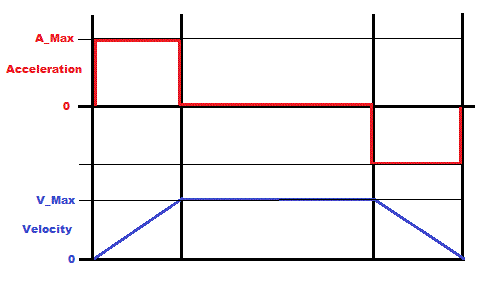
Motion profile generator.


Closed Thread
Results 1 to 40 of 56

Hybrid View

  1. #1
    Join Date
    Jul 2003
    Location
    Colorado Springs
    Posts
    4,959


    Did you find this post helpful? Yes | No

    Default Re: Motion profile generator.

    I think the obvious answer is to use floating point math ...
    But then the frequency of your interrupts may become more important. How fast are they?

    Or maybe you could take the remainder of the division and add it in a separate variable on each step, and when that overflows add one to Vel.
    When ramping down, subtract 1 on an underflow instead.
    It's kind of like floating point, as long as you're just adding and subtracting 1 unit each time.
    It's harder to do than the actual floating point, but is probably faster.
    DT

  2. #2
    Join Date
    Oct 2005
    Location
    Sweden
    Posts
    3,627


    Did you find this post helpful? Yes | No

    Default Re: Motion profile generator.

    Thanks Darrel,
    The interrupt rate varies depending on application but up to 2.5kHz.

    I guess by 'the division' you mean V_Max / A_Max ? Or do you mean Distance/2 (I don't think so since the reminder will either be 0 or 1)?
    So, in the previous, non ideal example I'd get 100//15 = 10.

    From there I don't quite follow... If I keep adding 10 to a BYTE variable it'll overflow on the 26th tick which is right at the very end of the profile in that previous example, that can't be right. On the other hand, for the acceleration step:
    Code:
    Accumulator = Accumulator + Reminder
    If Accumulator >= A_Max THEN
      Accumulator = Accumulator - A_Max
      Velocity = Velocity + 1
    END IF
    Is that in line with what you're thinking?

    I need to sleep on this I think. Thanks again!

    /Henrik.

  3. #3
    Join Date
    Jul 2003
    Location
    Colorado Springs
    Posts
    4,959


    Did you find this post helpful? Yes | No

    Default Re: Motion profile generator.

    Well, I was thinking more of the decimal remainder than the modulas remainder.

    But in trying to recreate the code, I'm seeing some big limitations in the theory.
    The only way to end up at the exact Target Position, is to have a Position that is an exact multiple of V_Max.

    With V_Max = 100, you can only get target positions of 1800, 1900, 2000, 2100 etc.
    I would think you would want more precise targets ...

    Currently, I can get +/- 5 counts from those targets by using the decimal remainder idea.
    I think I can change it to reach any target position, but then I see more problems down the road.

    This only ramps from 0 to a target.
    It won't go from target to target.
    Unless there's some other steps in the process that I'm missing.

    Here's some output from the test program.
    If I can figure the rest out, I'll post the code.
    Code:
    1 = Edit Max_Acceleration (10)
    2 = Edit Max_Velocity     (100)
    3 = Edit TargetPosition   (2000)
    Enter = GO
    >
    
        0       0       0   
       10      10      10   
       10      20      30   
       10      30      60   
       10      40     100   
       10      50     150   
       10      60     210   
       10      70     280   
       10      80     360   
       10      90     450   
       10     100     550   
       10     100     650   
       10     100     750   
       10     100     850   
       10     100     950   
       10     100    1050   
       10     100    1150   
       10     100    1250   
       10     100    1350   
       10     100    1450   
       10     100    1550   
       10      90    1640   
       10      80    1720   
       10      70    1790   
       10      60    1850   
       10      50    1900   
       10      40    1940   
       10      30    1970   
       10      20    1990   
       10      10    2000   
       10       0    2000   
    
    1 = Edit Max_Acceleration (10)
    2 = Edit Max_Velocity     (100)
    3 = Edit TargetPosition   (2000)
    Enter = GO
    >1
    Enter new Max_Acceleration (10):15
    
    Max_Acceleration = 15
    
    1 = Edit Max_Acceleration (15)
    2 = Edit Max_Velocity     (100)
    3 = Edit TargetPosition   (2000)
    Enter = GO
    >
    
        0       0       0   
       14      14      14   
       14      28      42   
       14      42      84   
       14      57     141   
       14      71     212   
       14      85     297   
       14      99     396   
       14     100     496   
       14     100     596   
       14     100     696   
       14     100     796   
       14     100     896   
       14     100     996   
       14     100    1096   
       14     100    1196   
       14     100    1296   
       14     100    1396   
       14     100    1496   
       14     100    1596   
       14     100    1696   
       14      86    1782   
       14      72    1854   
       14      58    1912   
       14      43    1955   
       14      29    1984   
       14      15    1999   
       14       0    1999   
    
    1 = Edit Max_Acceleration (15)
    2 = Edit Max_Velocity     (100)
    3 = Edit TargetPosition   (2000)
    Enter = GO
    >3
    Enter new TargetPosition (2000):1800
    
    TargetPosition = 1800
    
    1 = Edit Max_Acceleration (15)
    2 = Edit Max_Velocity     (100)
    3 = Edit TargetPosition   (1800)
    Enter = GO
    >
    
        0       0       0   
       14      14      14   
       14      28      42   
       14      42      84   
       14      57     141   
       14      71     212   
       14      85     297   
       14      99     396   
       14     100     496   
       14     100     596   
       14     100     696   
       14     100     796   
       14     100     896   
       14     100     996   
       14     100    1096   
       14     100    1196   
       14     100    1296   
       14     100    1396   
       14     100    1496   
       14      86    1582   
       14      72    1654   
       14      57    1711   
       14      43    1754   
       14      29    1783   
       14      14    1797   
       14       0    1797   
    
    1 = Edit Max_Acceleration (15)
    2 = Edit Max_Velocity     (100)
    3 = Edit TargetPosition   (1800)
    Enter = GO
    >2
    Enter new Max_Velocity (100):90
    
    Max_Velocity = 90
    
    1 = Edit Max_Acceleration (15)
    2 = Edit Max_Velocity     (90)
    3 = Edit TargetPosition   (1800)
    Enter = GO
    >
    
        0       0       0   
       15      15      15   
       15      30      45   
       15      45      90   
       15      60     150   
       15      75     225   
       15      90     315   
       15      90     405   
       15      90     495   
       15      90     585   
       15      90     675   
       15      90     765   
       15      90     855   
       15      90     945   
       15      90    1035   
       15      90    1125   
       15      90    1215   
       15      90    1305   
       15      90    1395   
       15      90    1485   
       15      90    1575   
       15      75    1650   
       15      60    1710   
       15      45    1755   
       15      30    1785   
       15      15    1800   
       15       0    1800   
    
    1 = Edit Max_Acceleration (15)
    2 = Edit Max_Velocity     (90)
    3 = Edit TargetPosition   (1800)
    Enter = GO
    >
    I'm just going from your description, I haven't tried to convert the original code.

    My questions:
    • Is it supposed to be able to move to any target position? Not just a multiple of V_Max?
    • Is it supposed to move from any position to any other position?
    • Or is that part handled in your routines? And this is just a "profile" that gets mapped onto the movement?
    Last edited by Darrel Taylor; - 28th January 2013 at 06:06.
    DT

  4. #4
    Join Date
    Oct 2005
    Location
    Sweden
    Posts
    3,627


    Did you find this post helpful? Yes | No

    Default Re: Motion profile generator.

    Hi Darrel,
    Thank you very much for spending time on this, I appreciate it!
    I guess +/-5 isn't TOO bad, always ending up short of target would be better than overshooting, then I could "creep" the position the last couple of counts but obviously ending up right on the spot was/is the goal.

    Is it supposed to be able to move to any target position? Not just a multiple of V_Max?
    Yes, absolutely. Any arbitrary position.

    Is it supposed to move from any position to any other position?
    Yes, absolutely. From one arbitrary position to another, in both directions. But I guess you can think the profile generator as moving from 0 to any position by simply taking the "output-position" of the profile generator and add that to the actual position variable. Ie the profile generator creates a relative position output which is then added to the real position variable. Hope that makes sense.

    Or is that part handled in your routines? And this is just a "profile" that gets mapped onto the movement?
    Not sure I understand, or perhaps the answer to the previous question covers it (reading it again I think it did)....
    Anyway, the feedback loop moves the motor to whatever position is put in the Position variable. But I need to "move" the target position at a speed that the motor and load can follow in real life. Simply stepping the position variable +/-12345 counts (or whatever) is very hard on the motor and for the PID-loop to handle without overshooting etc. It can be handled by de-tuning the filter to less than optimal response but who wants that.

    The best way to move from one position to another is to "move" the target position at a pace that the motor can actually follow. Ie ramp it up, keep at speed, ramp it down. Or, if the move is short, ramp up and at half the distance ramp down. Ideally it should be done with a 3rd order motion profile to reduce the jerk at the beginning and end of the acceleration phase. Ie you're not only ramping up/down the velocity but your also ramping up/down the acceleration creating an S-curved velocity profile instead of one with linear "sloped". But like I said, the 2nd order one proved hard enough.

    Again, thanks!

    /Henrik.

  5. #5
    Join Date
    Jul 2003
    Location
    Colorado Springs
    Posts
    4,959


    Did you find this post helpful? Yes | No

    Default Re: Motion profile generator.

    >Thank you very much for spending time on this, I appreciate it!
    You help everyone out too, it's nice to be able to do something for you for a change.

    Thanks for the explanations, now I have a better understanding of what it needs to do.

    Although the idea of just splitting the profile in half and doing the exact same thing in reverse for the second half was interesting ... that's what's causing it to only move to multiples of V_Max. I need to change that.

    And I need to make it go both directions, it only goes forward right now.

    I hope to have something by the time you wake up in the morning.
    Sometimes being on the other side of the planet is helpful.
    DT

  6. #6
    Join Date
    Oct 2005
    Location
    Sweden
    Posts
    3,627


    Did you find this post helpful? Yes | No

    Default Re: Motion profile generator.

    Thanks Darrel!

    Actually, I don't think you should need to worry about the direction. Perhaps I misunderstood your earlier question and overcomplicated my explaination after all.

    How about this:
    * The "global position variable" is the expected motor position at any given time. The PID loop servos the motor to this position.
    * The "relative position variable" is the output of the profile generator, exactly as you shown earlier, always starting a new move at 0.
    * When a new move is commanded it is easy to calculate if the target position is positive or negative relative to the current "global position".
    * A profile, starting at 0 and ending at ABS(Target Position - Global Position) is then generated.
    * Depending on the direction or "polarity" the output of the profile generator is added or subtracted from the Global Position variable one "tick" at a time.
    * The PID loop makes the motor follow the Global Position variable very smoothly and everyone's happy, especially me :-)

    Does that make sense?

    /Henrik.

    EDIT: Put another way... Acceleration is added to Velocity. Velocity is added to RelativePosition. RelativePosition is added to OR subtracted from GlobalPosition.
    Last edited by HenrikOlsson; - 28th January 2013 at 19:08.

  7. #7


    Did you find this post helpful? Yes | No

    Default Re: Motion profile generator.

    H,
    Ditto on you always helping everyone. If this isn't too elementary relating to where your at.......

    on de-celleration when V_Max reaches to 0...zero, recalculate the ACC (will be de-celerate) val.
    if you want the same amount of iterations to de-cel as used to acelerate, at A=10 then 100/10 for 10 loops or A=15 for 100/15 for 6? or 7? loops..............
    then subtract present pos (@ V_MAX=0) from desired pos. Thats the actual steps to stopping ??
    now use sum of # loops...( sum=loops(loops+1)/2) is new ACC val to loop to 0 (zero) over that many loops (should be +- 1 or 2 from the starting ACC val)
    now there will be either 0 or some amount less than A as a final step to stop.
    should be a few more lines of code to test and calc.
    I think Darrel mentioned re-calc something.
    don
    Last edited by amgen; - 28th January 2013 at 22:06.

  8. #8
    Join Date
    May 2013
    Location
    australia
    Posts
    2,720


    Did you find this post helpful? Yes | No

    Default Re: Motion profile generator.

    henrik how does this look ?
    can the pid routine take byte sized increments
    Attached Files Attached Files

  9. #9
    Join Date
    Oct 2005
    Location
    Sweden
    Posts
    3,627


    Did you find this post helpful? Yes | No

    Default Re: Motion profile generator.

    Richard,
    Slow down, I can't keep up at the moment! ;-)

    The PID routine works with the error between the desired motor position and the actual motor position, the error magnitude it's able to handle depends on how aggressively it's tuned. Ie with low gain it'll handle large errors without overflowing the internal registers, with high gains it won't be able to handle an equally large error. But generally speaking yes, it'll handle an error of 255 without problems.

    If the PID is executed 1000 times per second "stepping it" 255 counts each tick would equal a velocity of 255000 encoder counts per second. Using a 500 line encoder that equals a velocity of 7650rpm, pretty decent.

    Looking at the code in your latest post I can't seem to see where you specify the distance to be moved.... (?) But that says more about my abillity to read others code than anything else :-)

    I appreciate your ideas very much but at this time I don't see how precalculating the move is going to work in real life. One move might last 100ms while another 100s. One move might travel 25 counts while another might travel 100000 counts.

    An example:
    I'm at position 0.
    * I want to go to position 4690
    * I want the velocity to be 123 counts per tick
    * I want the acceleration to be 8 counts/tick/tick

    Code:
    Tick	Accel	Vel	Pos	
    1	8	8	0	
    2	8	16	8	
    3	8	24	24	
    4	8	32	48	
    5	8	40	80	
    6	8	48	120	
    7	8	56	168	
    8	8	64	224	
    9	8	72	288	
    10	8	80	360	
    11	8	88	440	
    12	8	96	528	
    13	8	104	624	
    14	8	112	728	
    15	8	120	840	
    16	3	123	960	<---Velocity clamped at 123
    At tick 16 increasing the velocity by the set acceleration would violate the set velocity so the velocity is clamped at that point. No problems with that or the code to do it.
    At this point I know that it took 16 ticks and a total distance of 960 counts to get up to speed. So all that is needed is to start decelerating 960 counts from the desired target position, ie at position 4690-960=3730.

    The problem is that when moving at 123 counts/tick the target position will never be exactly 3730 at a specific tick. It'll be either 3675 at tick 38 and 3798 at tick 39:
    Code:
    Tick	Accel	Vel	Pos
    17	0	123	1083	
    18	0	123	1206	
    19	0	123	1329	
    20	0	123	1452	
    21	0	123	1575	
    22	0	123	1698	
    23	0	123	1821	
    24	0	123	1944	
    25	0	123	2067	
    26	0	123	2190	
    27	0	123	2313	
    28	0	123	2436	
    29	0	123	2559	
    30	0	132	2682	
    31	0	123	2814	
    32	0	123	2937	
    33	0	123	3060	
    34	0	123	3183	
    35	0	123	3306	
    36	0	123	3429	
    37	0	123	3552	
    38	0	123	3675	<---Should I start here?
    39		123	3798	<---Or should I start here?
    So, if I start decelerating (8 counts/tick/tick) at position 3675 I end up short. If start accelerating (8 counts/tick/tick) at position 3798 I end up overshooting - that's the issue with this.

    What I'm currently doing in my code is detecting when the distance to target is equal to or less than the distance traveled during the acceleration phase (that would be at tick 39 above) and then recalculate the needed acceleration (deceleration) in order to end up at target. That, however, isn't a one shot kind of thing since the needed acceleration (deceleration) might be 8.324 counts/tick/tick which obviously won't work with PBP. So, next tick I recalculate again and again and again - all the way to the end. The acceleration (deceleration) will toggle between 8 and 9, something like 8,8,8,8,9,8,8,8,9,8,8,8,8,9 - perhaps.

    This seems to work in simulation, I have yet to try it on real hardware. The drawback of course is it takes a lot processing power due the division involved in the math.

    The above numbers are just an example. The desired acceleration can be "any" number, the desired velocity can be "any" number and distance to move can be anything between 0 and several million counts. And they can change from one move to another.

    Thanks Richard!

    /Henrik.

  10. #10
    Join Date
    Nov 2003
    Location
    Greece
    Posts
    4,175


    Did you find this post helpful? Yes | No

    Default Re: Motion profile generator.

    If you are, as in your example, between tick 38 and 39, you are almost on target position.

    Why not change acceleration to 1 count/tick/tick sinc the drop in speed will not be noticed and you will get the exact steps you need?

    I am not an expert on this, just droped my idea.

    Ioannis

  11. #11
    Join Date
    Oct 2005
    Location
    Sweden
    Posts
    3,627


    Did you find this post helpful? Yes | No

    Default Re: Motion profile generator.

    Hi,
    I'm definitely no expert either, hence this thread ;-)

    I'm not sure I follow your reasoning though. Where should I change acceleration to 1 (-1 actually), at step 38?
    If I do that the velocity becomes 122 instead of 123 and the position at tick 39 becomes 3797 instead of 3798....then what should I do?

    In order to "hit" 3730 at tick 39 the acceleration at step 38 would have to be 68 (8.5 times that of the programmed rate!) so that the velocity becomes 123-68=55 and the position at tick 39 becomes 3675+55=3730.

    BUT, even if I could live with that gross violation of the programmed acceleration (which I just can't) the velocity is now 55 so if I now continue to decelerate at the programmed rate of 8 counts/tick/tick I would end up WAY short since the "deceleration sweet spot" of 3730 was "based" on a velocity of 123.... (Velocity will reach zero at tick 45 at which the position will be 3892 when I shooting for 4690).

    I hope that makes sense and if there's something I'm missing (which by no means is unlikely) please elaborate!

    /Henrik.

  12. #12
    Join Date
    May 2013
    Location
    australia
    Posts
    2,720


    Did you find this post helpful? Yes | No

    Default Re: Motion profile generator.

    its mainly the idea's I'm experimenting with at this stage . this one is to increment the setpoint not at the pid update rate but a rate that suits the acceleration / velocity . in the example that would be every 8 mS. it would be fairly simple to clamp the velocity at any rate after the acceleration move (the pid offset is constant), short moves can easily be accommodated by calculatining a lower vmax, the decelerate phase would begin when distance remaining = or less than the total accelerate displacement and then the accelerate parameter blocks are fed into pid setpoint in reverse leaving no doubt at all for the final move. assuming of course that you can sync the real position with where the ramp-generator thinks it is but you have plenty of steps here to adjust out any error.
    speed wise after the initial "move" parameters are calculated the array could be filled in on the fly if you have the processing time, I like the array idea because it applies easily to both acceleration phases for the move. biggest problem I can see is that the block rate could vary with each "move " (this keeps the numbers manageable) so you would to be able to provide an accurate but variable timebase for the block clock
    its a work in progress
    Attached Images Attached Images
    Last edited by richard; - 23rd September 2014 at 15:51. Reason: added pdf

  13. #13
    Join Date
    Oct 2005
    Location
    Sweden
    Posts
    3,627


    Did you find this post helpful? Yes | No

    Default Re: Motion profile generator.

    Hi Richard,
    this one is to increment the setpoint not at the pid update rate but a rate that suits the acceleration / velocity
    Yes, I'd probably not run it at the PID rate either but for the purpose of the discussion it makes it easier. I probably wouldn't want to run it slower than say 50 times per second though since that would make the motion jerky. So, with a fixed array size of 64 the longest move possible is 1.28s

    the decelerate phase would begin when distance remaining = or less than the total accelerate displacement and then the accelerate parameter blocks are fed into pid setpoint in reverse leaving no doubt at all for the final move
    Exactly, but that's the big problem. Because if you don't start "playing back" the accelerate parameter block in reverse at exactly the right position you will reach zero velocity either before or after you reach the target position. And since the motor is moving at a velocity of 240 counts (in your example .pdf) per update the likelyhood of hitting (target position - 7620) (where 7620 is the total displacement during acceleration in your example) is slim.

    Accelerating is easy, clamping the velocity is easy, moving at velocity is easy, even decelerating is easy. The hard part is ending up at exactly the desired position.
    Your .pdf shows a nice ramp from 0 to 30000 in velocity. Now see if you can keep moving at the velocity and then, at any given "tick", start playing back the acceleration ramp in reverse and get to position 55727. To do that you need to start playing back the acceleration ramp in reverse exactly at position 55727-7620 but since the motor is moving at 240 counts per update you're never going to hit that exact location.

    I'm obviously too far into my own thinking and can't see the forest due to the trees.....prove me wrong will you ;-)

    /Henrik.

Similar Threads

  1. Motion Capturing
    By koossa in forum Off Topic
    Replies: 0
    Last Post: - 30th June 2009, 12:05
  2. Suggest a motion sensor Please
    By sougata in forum mel PIC BASIC Pro
    Replies: 4
    Last Post: - 4th March 2007, 14:22
  3. Wireless Motion Sensors.
    By koossa in forum mel PIC BASIC Pro
    Replies: 9
    Last Post: - 17th October 2006, 22:57
  4. Need low Profile LCDs
    By Foxx373 in forum General
    Replies: 8
    Last Post: - 26th October 2005, 18:33
  5. Motion Tracking
    By JEC in forum mel PIC BASIC Pro
    Replies: 5
    Last Post: - 5th November 2004, 01:58

Members who have read this thread : 0

You do not have permission to view the list of names.

Posting Permissions

  • You may not post new threads
  • You may not post replies
  • You may not post attachments
  • You may not edit your posts