Hi, I did some testing but this time using PIC16F887 on 5v just to isolate the specific program which is to read the accelerometer module on 3.3v..using the following code.
Code:
'' Program Start Here ''

DEFINE osc 20           ' We're using a 4 MHz oscillator
DEFINE ADC_BITS 8       ' Set A/D for 8-bit operation
DEFINE ADC_CLOCK 3      ' Set A/D clock Fosc/8
DEFINE ADC_SAMPLEUS 50  ' Set A/D sampling time @ 50 uS

ANSEL = %11111111 ' Make AN0-AN7 Analog
ANSELH= %00000000 ' Make AN8-AN13 digital

accx var byte
accy var byte
accz var byte

DataOut var Byte
DataOut = 0

'    PORT setting
    '    ============
         '
          TRISA = %11111111   ' Set PORTA to all input
          ADCON1 = %0001001  ' Set PORTA.0,1,2,4,5,6 = A/D, PortA.3 = +Vref
          TRISC = %10000000        ' RC.7 => USART RX pin set to input
                                ' all other pin set to output
         'OPTION_REG = $7f       ' Enable PORTB pull-ups
                                '
         TRISB=%00000000                ' RB<7:0> set to output
         TRISD=%00000000

'    USART setting
    '    =============
         ' Since we will not use HSERIN/HSEROUT, we must
         ' write directly to internal PIC register
         '
         TXSTA=$24              ' enable transmit and SPBRGH=1
         RCSTA=$90              ' Enable USART and continuous receive
         SPBRG=129          ' BAUD RATE = 9600 BAUDS

'    Interrupt definition
    '    ====================
         '
         PIE1.5   =1            ' enable USART receive interrupt
         INTCON.6 =1            ' enable peripheral interrupt

    '    Alias definition
    '    ================
         '
         RCIF       var PIR1.5   ' receiver interrupt
         UserLED1   var PORTB.0  ' the LED who show a 'running process'
         UserLED2   var PORTB.1  ' the LED1 that user want to control
         UserLED3   var PORTB.2  ' the LED2 that user want to control


    '    Variable definition
    '    ===================
         '
         Delay     var word     '
         DataIn    var byte     ' use to store RCREG content
         Discard   var byte     ' use to erase RCREG register

    '    Hardware/software initialisation
    '    ================================
         '
         PORTB=0                ' clear PORTB
         PORTC=0                ' dlear PORTC
         on interrupt goto USARTInterrupt


    PAUSE 500           ' Wait .5 second

loop1:
    ADCIN 0, accx: ADCIN 1, accy: ADCIN 2, accz
    Hserout["Data receive: X:",Dec accx," Y:",Dec accy," Z:" ,Dec accz, 13]
    Pause 200

    GOTO loop1               ' Do it forever

    END

disable interrupt
USARTInterrupt:
    '    Here's the interrupt routine who will make the user
    '    much happy by giving him the feeling to have the
    '    control on the machine when the status of the user
    '    LED will change
    '
    RCSTA=0                     ' Disable serial port AND
                                ' clear possible error (FERR,OERR)

    datain=RCREG                ' Get data

    while RCif                  ' wait untill the RCREG is empty
          discard=RCREG         ' by reading it and store result in a
    wend                        ' don't care variable

    select case datain          ' What to do with that data???

           case "1"            ' User selection = 1
                userled1=1       '      => Enable the LED

           case "2"           ' User selection =2
                userled1=0       '      => disable the LED

           case "3"           ' User selection =2
                userled2=1       '      => disable the LED

           case "4"           ' User selection =2
                userled2=0       '      => disable the LED

           case "5"           ' User selection =2
                userled3=1       '      => disable the LED

           case "6"           ' User selection =2
                userled3=0       '      => disable the LED

           case "a"           ' User selection =2
                PortB=%00000111       '      => disable the LED
           case "d"           ' User selection =2
                PortB=%00000000       '      => disable the LED


           end select
    RCSTA=$90                   ' Re-enable the serial PORT AND
    resume                      ' get out of here
enable interrupt
I have the following reading:
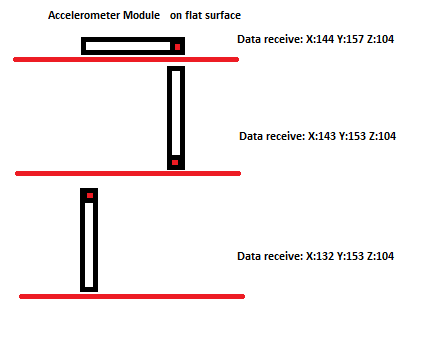
and I think I'm not getting the right output...what might causing it?
Kind regards,
tacbanon


 Re: Reading sensors with 3.3v(beginner)


 .
.


Bookmarks