read again the readme.txt file example ...
you have 2 extra argument in ADDCUSTOMCHAR, here you should have
ADDCUSTOMCHAR CHR_CUSTOM_0, 0x04, 0x00, 0x00, 0x00, 0x00
not
ADDCUSTOMCHAR CHR_CUSTOM_0, 0x04, 0x00, 0x00, 0x00, 0x00, 0x00, 0x00
read again the readme.txt file example ...
you have 2 extra argument in ADDCUSTOMCHAR, here you should have
ADDCUSTOMCHAR CHR_CUSTOM_0, 0x04, 0x00, 0x00, 0x00, 0x00
not
ADDCUSTOMCHAR CHR_CUSTOM_0, 0x04, 0x00, 0x00, 0x00, 0x00, 0x00, 0x00
Steve
It's not a bug, it's a random feature.
There's no problem, only learning opportunities.
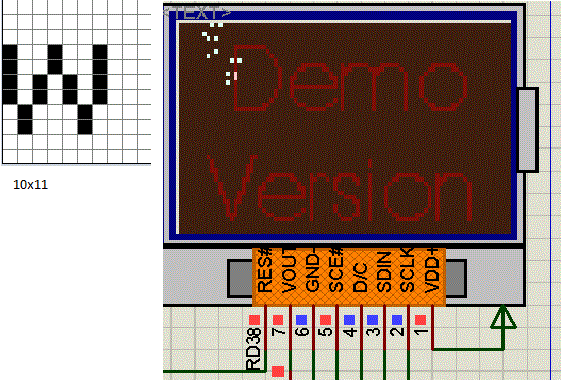
it compiled with no problem now, but custom character won't display on the lcd, probably I'm still doing it wrong..
I'm expecting a letter 'j' in the 3rd row.
I appreciate the time for helping out.Code:DEFINE GLCD_CHAR_IN_EEPROM ' store/read character/lookuptable to/from EEPROM DEFINE GLCD_STRING_IN_EEPROM ' store/read string to/from EEPROM DEFINE GLCD_USE_SPECIFIC_CHARACTER ' We will define our own set of character to be used INCLUDE "..\Include\GLCD_NOKIA.PBP" ' Plug the Nokia Driver/Wrapper in here ASM CHARTABLESTART ADDCUSTOMCHAR CHR_CUSTOM_0, 0x04, 0x00, 0x00, 0x00, 0x00 ADDCHAR 'e' ADDCHAR 'l' ADDCHAR 'o' ADDCHAR 'w' ADDCHAR 'r' ADDCHAR 'd' ADDCHAR '!' CHARTABLEEND ENDASM ' '------------------------------< Main program >--------------------------------------------- ' ASM GLCD_CLS ; Clear the screen (if not initialized yet, it will do automatically) GLCDOUT_AT?STR 0,0,"Hello World!" ; Show String on Line 0 GLCDOUT_AT?STR 0,1,"Wello World!" ; Show String on Line 1 GLCDOUT_AT?STR 0,2,"j" ; Show 'j' on Line 2 ENDASM Here: GOTO Here ' sit & spin
regards,
tacbanon
![]()
You'll see a J once you'll add it in the character you want to use.... no coincidence why you don't have the H nor the W either
Again it's all explained in the Readme.txt file...
Steve
It's not a bug, it's a random feature.
There's no problem, only learning opportunities.
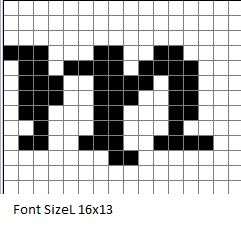
I'm trying to display a 10x11 font size "w" but not displaying right to the lcd...(sorry if I'm very slow catching up)
Code:DEFINE GLCD_CHAR_IN_EEPROM ' store/read character/lookuptable to/from EEPROM DEFINE GLCD_STRING_IN_EEPROM ' store/read string to/from EEPROM DEFINE GLCD_USE_SPECIFIC_CHARACTER ' We will define our own set of character to be used INCLUDE "..\Include\GLCD_NOKIA.PBP" ' Plug the Nokia Driver/Wrapper in here ASM CHARTABLESTART ADDCHAR 'T' ADDCHAR 'E' ADDCHAR 'X' ADDCHAR 'a' ADDCHAR 'b' ADDCHAR '!' ADDCHAR CHR_NUMBERS ADDCUSTOMCHAR CHR_CUSTOM_0,0x04,0x88,0x01,0x48,0x01 ADDCUSTOMCHAR CHR_CUSTOM_1,0x28,0x01,0x18,0x01,0x00 ADDCUSTOMCHAR CHR_CUSTOM_2,0x00,0x00,0x00,0x00,0x00 ADDCUSTOMCHAR CHR_CUSTOM_3,0x00,0x00,0x00,0x00,0x00 ADDCUSTOMCHAR CHR_CUSTOM_4,0x00,0x00,0x00,0x00,0x00 CHARTABLEEND ENDASM ' '------------------------------< Main program >--------------------------------------------- ASM GLCD_CLS ; Clear the screen (if not initialized yet, it will do automatically) GLCDOUT_AT?CHR 1,0,CHR_CUSTOM_0 GLCDOUT_AT?CHR 2,1,CHR_CUSTOM_1 ; Show String on Line 0 GLCDOUT_AT?CHR 3,2,CHR_CUSTOM_2 GLCDOUT_AT?CHR 4,3,CHR_CUSTOM_3 GLCDOUT_AT?CHR 5,4,CHR_CUSTOM_4 ENDASM Here: GOTO Here ' sit & spin '![]()
Code:' ' Includes ' ======== DEFINE GLCD_CHAR_IN_EEPROM ' store/read character/lookuptable to/from EEPROM DEFINE GLCD_STRING_IN_EEPROM ' store/read string to/from EEPROM define GLCD_CHAR_6X8 DEFINE GLCD_USE_SPECIFIC_CHARACTER ' We will define our own set of character to be used INCLUDE "..\Include\GLCD_NOKIA.PBP" ' Plug the Nokia Driver/Wrapper in here ASM CHARTABLESTART ADDCHAR 'T' ADDCHAR 'E' ADDCHAR 'X' ADDCHAR 'a' ADDCHAR 'b' ADDCHAR '!' ADDCHAR CHR_NUMBERS ADDCUSTOMCHAR CHR_CUSTOM_0,0x78,0x80,0x60,0x18,0x60,0x80 ; ADDCUSTOMCHAR CHR_CUSTOM_1,0x78,0x00,0x00,0x00,0x00,0x00 ; ADDCUSTOMCHAR CHR_CUSTOM_2,0x00,0x01,0x00,0x00,0x00,0x01 ; ADDCUSTOMCHAR CHR_CUSTOM_3,0x00,0x00,0x00,0x00,0x00,0x00 ; CHARTABLEEND ENDASM ' '------------------------------< Main program >--------------------------------------------- ASM GLCD_CLS ; Clear the screen (if not initialized yet, it will do automatically) GLCDOUT_AT?CHR 0,0,CHR_CUSTOM_0 GLCDOUT_AT?CHR 1,0,CHR_CUSTOM_1 GLCDOUT_AT?CHR 0,1,CHR_CUSTOM_2 GLCDOUT_AT?CHR 1,1,CHR_CUSTOM_3 GLCDOUT_AT?STR 5,6,"TEXT!" ENDASM
Steve
It's not a bug, it's a random feature.
There's no problem, only learning opportunities.
Finally got it...thanks for the help.
![]()
Way cool
Thanks and Enjoy!
Steve
It's not a bug, it's a random feature.
There's no problem, only learning opportunities.
Bookmarks