LCD cable length?


Closed Thread
Results 1 to 28 of 28

Hybrid View

  1. #1
    Join Date
    Aug 2003
    Posts
    985


    Did you find this post helpful? Yes | No

    Default Re: LCD cable length? > 40 feet.

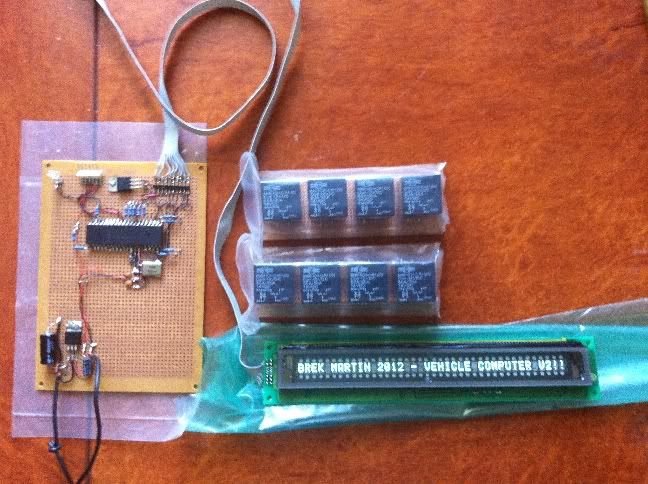
    It's a VFD display with the standard LCD controller.


    It's working with one metre of cable, but a bit hit & miss.
    No garbled text, but sometimes it doesn't come on at all.
    Maybe it just needed a longer startup time than the usual PAUSE 1000.
    Ideally, I want about five metres of cable length, so I'll keep reading!

  2. #2
    Join Date
    Jul 2003
    Location
    Colorado Springs
    Posts
    4,959


    Did you find this post helpful? Yes | No

    Default Re: LCD cable length? > 40 feet.

    In the thread where we ran them on 25/40ft cables, the LCDOUT library routines were over-ridden so the timing could be changed.

    Normally, the LCDOUT command gives a 1uS pulse on the enable line.
    But as the cable gets longer, 1uS isn't enough.
    I used 5uS for the 25 ft length, which seemed to overcome the rounding off of the waveform on a scope.

    You might try using the routines from that thread with the modified timing.
    Essentially, it's the LCD_AnyPin routines with a few modifications.
    DT

  3. #3
    Join Date
    Aug 2003
    Posts
    985


    Did you find this post helpful? Yes | No

    Default Re: LCD cable length? > 40 feet.

    Will do, thanks
    I think I'll have to.

  4. #4
    Join Date
    Aug 2003
    Posts
    985


    Did you find this post helpful? Yes | No

    Default Re: LCD cable length? > 40 feet.

    A little problem...
    Installed the hijack routines and the two files in PBP directory.
    When I use the include file for lcdanypin, I get an error (using MPASM)
    for line 87 which is this line:
    LOW LCD_RS : HIGH LCD_E

    If I comment that out I then get a lot of errors

  5. #5
    Join Date
    Jul 2003
    Location
    Colorado Springs
    Posts
    4,959


    Did you find this post helpful? Yes | No

    Default Re: LCD cable length? > 40 feet.

    LCD_RS and LCD_E should be declared in your program, along with the other LCD pins.
    Something like ...
    Code:
    ;----[ Change these to match your LCD ]--------------------------------------- 
    LCD_DB4    VAR PORTA.0 
    LCD_DB5    VAR PORTB.3 
    LCD_DB6    VAR PORTB.7 
    LCD_DB7    VAR PORTC.1 
    LCD_RS     VAR PORTD.4 
    LCD_E      VAR PORTA.1 
    LCD_Lines  CON 2 ' # of Lines on LCD, 1 or 2 (Note: use 2 for 4 lines) 
    LCD_DATAUS CON 50 ' Data delay time in us 
    LCD_COMMANDUS CON 2000 ' Command delay time in us 
    INCLUDE "LCD_AnyPin.pbp" ; *** Include MUST be AFTER LCD Pin assignments ****
    
    DT

  6. #6
    Join Date
    Aug 2003
    Posts
    985


    Did you find this post helpful? Yes | No

    Default Re: LCD cable length? > 40 feet.

    Oops!

  7. #7
    Join Date
    Aug 2003
    Posts
    985


    Did you find this post helpful? Yes | No

    Default Re: LCD cable length? > 40 feet.

    Bah! Still not having much luck here,
    I have the LCD routines working, and changed the LCD_anypin file as follows:
    Code:
    ;===============( DO NOT Change anything below this line )====================
    ;----[Virtual LCD Port --- 4bit mode]-----------------------------------------
    ASM
    LCD_Port_HNIB  macro           ; Port definition for LCD High Nibble
        Vbit   LCDCDFLAG, _LCD_RS  ; Select Command/Data register
        Vpin   4, _LCD_DB4         ; Put the High Nibble on the bus
        Vpin   5, _LCD_DB5
        Vpin   6, _LCD_DB6
        Vpin   7, _LCD_DB7
        PulseLow  _LCD_E, 5        ; pulse the Enable Pin for 2 us
      endm
    ;-----------------------    
    LCD_Port_LNIB  macro           ; Port definition for LCD Low Nibble 
        Vpin   0, _LCD_DB4         ; Put the Low Nibble on the bus
        Vpin   1, _LCD_DB5
        Vpin   2, _LCD_DB6
        Vpin   3, _LCD_DB7
        PulseLow  _LCD_E, 5        ; pulse the Enable Pin for 2 us
      endm
    ENDASM
    Since I'm only using a single display, hopefully that's all that is needed to enable the E pin for 5us.
    Still the display coming on at all after startup is hit & miss.
    It seems to come on straight after programming with the pickit2 (when powered by the pickit2,
    but doesn't want to come on when powered by any other means (or even by the pickit2 when not being programmed).

Members who have read this thread : 0

You do not have permission to view the list of names.

Posting Permissions

  • You may not post new threads
  • You may not post replies
  • You may not post attachments
  • You may not edit your posts