


Hi,
As told in the Title ...
Still a beta Version, but really promising.
http://www.microchip.com/MPLABX
Alain


 A new MPLAB IDE
Hi,
As told in the Title ...
Still a beta Version, but really promising.
http://www.microchip.com/MPLABX
Alain
************************************************** ***********************
Why insist on using 32 Bits when you're not even able to deal with the first 8 ones ??? ehhhhhh ...
************************************************** ***********************
IF there is the word "Problem" in your question ...
certainly the answer is " RTFM " or " RTFDataSheet " !!!
*****************************************

 |
|

Hi Alain.
Have you tested with PBP? Does the new X IDE support the lanquage?
Ioannis
|
Hi, Ioannis
The beta version , to the day, only supports "Microchip" compilers, but It's of course planned to support Third Party ones ... the "add toolsuite " feature already is here !!!
So you have to use assembler or C without conditionnal assembly ... for the moment.
remember it's NOT at production level and many features are still disabled.
PicStart plus is no more supported as a programmer ... halas !
Alain
************************************************** ***********************
Why insist on using 32 Bits when you're not even able to deal with the first 8 ones ??? ehhhhhh ...
************************************************** ***********************
IF there is the word "Problem" in your question ...
certainly the answer is " RTFM " or " RTFDataSheet " !!!
*****************************************
|
Sorry for the late reply, but e-mail notifications still do not work...
Thanks for the feedback.
Sorry that PicStart and PicStart+ are not supported. I have the both of them...
Anyway, technology keeps moving forward, so we adapt, right?
Ioannis
|
Was/ is there a command line option for the PicStart+ ?
Dave
Always wear safety glasses while programming.
|
|
Darn...
looks like another gadget for the shelf. But I have not used mine for a year or so anyway.
Dave
Always wear safety glasses while programming.
|
I got Picstart, Picstart+, ICD1, ICD3, Pickit3 and ELNEC PikProg+.
I think I have a record! Anyone else?
By the way, do you receive e-mail notifs?
Ioannis
|
You got me beat. I only have PicStart+, PicKit 1, and a couple of PicKit 2.
Nope, no email for a couple of weeks and no news either.
Dave
Always wear safety glasses while programming.
|
Ooh, I forgot. I am expecting another Pickit3, as a gift from the Local Microchip Seminar! (Plus the touch clock they gave us with a AAAA battery!)
Ioannis
 |
|
there's PICP, but you may miss loads of new devices... it's an open-source though... worth it?Originally Posted by mackrackit

Steve
It's not a bug, it's a random feature.
There's no problem, only learning opportunities.
|
Probably not worth it. Portable computers with serial ports getting hard to find/cost to much.....
A PicKit2 on the bench and one in the go bag and I am set.
I will just put the PicStart in the shed. The Tandy and C64 need company.
Dave
Always wear safety glasses while programming.
|
Those are beauty... when I was young... Any chance you have a TI99 and a VIC20 as well
BTW, did you have a look at Commodore website? He's back! http://www.commodoreusa.net/CUSA_C64.aspx
Last edited by mister_e; - 2nd January 2011 at 21:03.
Steve
It's not a bug, it's a random feature.
There's no problem, only learning opportunities.
|
Nope.Any chance you have a TI99 and a VIC20 as well
That new C64 looks interesting. It would make a great conversation piece...
But Steve... you are not looking so good
Dave
Always wear safety glasses while programming.
|
Jealous
Steve
It's not a bug, it's a random feature.
There's no problem, only learning opportunities.
|
Anyone for an Unicom 202SR, a HP35, HP29C, and full options HP86B ???
Plus Casio Fx 850 and 880P ...
Alain
BTW, DO NOT upgrade MPLAB to V 8.63 ... there's a bug and previous ASM projects cause a MPLAB Locking when Built.
PBP projects do not seem to fail, but ... better to be careful.
Last edited by Acetronics2; - 3rd January 2011 at 10:10.
************************************************** ***********************
Why insist on using 32 Bits when you're not even able to deal with the first 8 ones ??? ehhhhhh ...
************************************************** ***********************
IF there is the word "Problem" in your question ...
certainly the answer is " RTFM " or " RTFDataSheet " !!!
*****************************************
 |
|
Alain,
Do you have an example program that will lockup with MPLAB 8.63?
I can't seem to duplicate it with ASM programs that I have.
If Microchip messed something up again, melabs needs to know.
Thanks,
DT
|
Hi, Darrel
Nothing special with those asm files ... their compilation ALWAYS create an IDE locking.
I re-installed v 8.63 : still locking
went Back to V 8.60 and everything works fine ...
soooooo, I really think it's a bug !!! ( no line about any projects mods to do in the IDE release notes )
My OS is XP Home SP3 " up to date " ...
Have a happy new year
Alain
************************************************** ***********************
Why insist on using 32 Bits when you're not even able to deal with the first 8 ones ??? ehhhhhh ...
************************************************** ***********************
IF there is the word "Problem" in your question ...
certainly the answer is " RTFM " or " RTFDataSheet " !!!
*****************************************
|
The End ... big Mystery.
I had made 4 attempts ...
4 times it has bugged ...
A last one to send Microchip a screenshot ....
MPLAB was very, very long to start this time ( ~ 5 minutes ) , and there were strange things about the last used compiler location ( blank address ! ) ... but , once correctly answered, project compiled correctly.
with no more strange issues.
Sooooo ... what has happend ???
Great Mystery !!!
Alain
Last edited by Acetronics2; - 9th January 2011 at 11:29.
************************************************** ***********************
Why insist on using 32 Bits when you're not even able to deal with the first 8 ones ??? ehhhhhh ...
************************************************** ***********************
IF there is the word "Problem" in your question ...
certainly the answer is " RTFM " or " RTFDataSheet " !!!
*****************************************
|
Mpasm broken?
The ide update appears to break mpasm
I now get the following error on all my old projects
error 118 overwrite previous address contents I tried to go back to 8.10 and still have the same error now :roll:
http://www.microchip.com/forums/m439213.aspx
Which working version are others using?
|
That is from setting the configs in two places. You must be setting them in code space with out commenting the PBP *.inc files.error 118 overwrite previous address contents
Dave
Always wear safety glasses while programming.
|
Use the one that came on the cd when you purchased PBP. That one works.Which working version are others using?
Dave
Always wear safety glasses while programming.
 |
|
I am using MPLAB IDE 8.60 (MPASM 5.38) with PBP 2.60
What version of PBP do you have?
|
2.60A I'm away on holiday and dont have by pbp cd with me.
It's not setting the configs twice. The link I posted seems to suggest something has chan ged with mpasm.
Last edited by retepsnikrep; - 29th January 2011 at 18:14.
|
Maybe if you posted your code and configs it would help.
Or just install from your CD when you can.... That is what it is for. Everything you need in one convenient place.
Dave
Always wear safety glasses while programming.
|
Sorted now it was the configs :roll: Appologies for doubting the gurus on here
|
Re: A new MPLAB IDE
Hi, All
Great News ...
MPLABX supports PBP Now ....
Sure Charles could tell us some words about it ... ( about the use or not of PBPMPLAB.bat ... i.e.)
and may be explain me that ...
Alain/usr/bin/make -f nbproject/Makefile-default.mk SUBPROJECTS= .build-conf
make[1]: Entering directory `/c/Program Files/Microchip/MPLAB IDE/Projets/X/Lights.X'
/usr/bin/make -f nbproject/Makefile-default.mk dist/default/production/Lights.X.production.cof
make[2]: Entering directory `/c/Program Files/Microchip/MPLAB IDE/Projets/X/Lights.X'
mkdir -p build/default/production
C:\\Program\ Files\\Microchip\\MPLAB\ IDE\\PBP\\PBPW.EXE -ampasmx -k# -p12f675 Lights.pbp
make[2]: *** [build/default/production/Lights\.cof] Error 1
make[1]: *** [.build-conf] Error 2
make: *** [.build-impl] Error 2
PICBASIC PRO(TM) Compiler 2.60C, (c) 1998, 2011 microEngineering Labs, Inc.
All Rights Reserved.
ERROR: Unable to execute mpasmx.make[2]: Leaving directory `/c/Program Files/Microchip/MPLAB IDE/Projets/X/Lights.X'
make[1]: Leaving directory `/c/Program Files/Microchip/MPLAB IDE/Projets/X/Lights.X'
BUILD FAILED (exit value 2, total time: 609ms)
Last edited by Acetronics2; - 5th May 2011 at 13:43.
************************************************** ***********************
Why insist on using 32 Bits when you're not even able to deal with the first 8 ones ??? ehhhhhh ...
************************************************** ***********************
IF there is the word "Problem" in your question ...
certainly the answer is " RTFM " or " RTFDataSheet " !!!
*****************************************
 |
Re: A new MPLAB IDE
|
Re: A new MPLAB IDE
Yes, do tell us more please.
I've been playing around with the evaluation version of UltraEdit and I'm starting to get code folding and syntax highlighting to a place where I want it but there are many other things that needs sorting (and removed from the default layout) for it to be worth it.
If MBLAB X is the bee's knees then there's no need to spend the time and cash on UE.
|
Re: A new MPLAB IDE
Download is here :
http://www.microchip.com/en_US/family/mplabx/index.html
Alain
************************************************** ***********************
Why insist on using 32 Bits when you're not even able to deal with the first 8 ones ??? ehhhhhh ...
************************************************** ***********************
IF there is the word "Problem" in your question ...
certainly the answer is " RTFM " or " RTFDataSheet " !!!
*****************************************
 |
Re: A new MPLAB IDE
|
Re: A new MPLAB IDE
How does this compare with Mecanique Microcode Studio Plus?
Is it worth changing if I'm used to MCSP?
I know it's free, but MCSP is already paid.
I remember looking at MPLAB when I first started and it didn't look as user friendly as MCS, things just didn't look at intuitive. It could have been just me, tastes and first impressions affect our choices so drastically.
My Creality Ender 3 S1 Plus is a giant paperweight that can't even be used as a boat anchor, cause I'd be fined for polluting our waterways with electronic devices.
Not as dumb as yesterday, but stupider than tomorrow!
|
Re: A new MPLAB IDE
IMPORTANT
AlainFor beta 6 support PICBASIC PRO and CCSC was added. However, support to import an MPLAB 8 project using this compilers is not there yet. You need to recreate the projects using the "Standalone Project" wizard.
Also, to use the PICBASIC PRO, you might need to add mpasmx to your path: add $InstallationDir\mpasmx. For example, if you installed to the default MPLAB X installation directory in a 32 bit Windows system, you'd need this in your path:
C:\Program Files\Microchip\MPLABX\mpasmx
Do this if you get the error:
ERROR: Unable to execute mpasmx.make[2]:
If you change your path, you need to re-start MPLAB X.
************************************************** ***********************
Why insist on using 32 Bits when you're not even able to deal with the first 8 ones ??? ehhhhhh ...
************************************************** ***********************
IF there is the word "Problem" in your question ...
certainly the answer is " RTFM " or " RTFDataSheet " !!!
*****************************************
|
Re: A new MPLAB IDE
I sure agree with you Robert.
The MPLAB feels like the ... bad old DOS environment.
I prefer the MCS too.
The X is different from the old 8.xx and promisses to give some whistles and bells.
If anyone has tested the editor please report.
I do not want to download the over 200Mb beast just to see that I do not like it...
Ioannis
|
Re: A new MPLAB IDE
Plenty of user experiences over at the MCHP Forums http://www.microchip.com/forums/default.aspx
Why pay for overpriced toys when you can have
professional grade tools for FREE!!!
|
Re: A new MPLAB IDE
Hi,
MCSP is great but it doesn't seem to be maintained any more which is unfortunate. It lacks code folding (so does MPLAB 8.xx when used with PBP, AFAIK) and it lacks "true" source level debugging.How does this compare with Mecanique Microcode Studio Plus?
Norm is onto something with his FineLineIDE but I don't think it'll provide source level debugging.
/Henrik.
|
Re: A new MPLAB IDE
Have not found something related to PBP though...
Ioannis
|
Re: A new MPLAB IDE
Perhaps Ace is the only one who has used it with PBP - and he's not telling.
Why pay for overpriced toys when you can have
professional grade tools for FREE!!!
|
|
Tesla tesla tesla
I say, no picture, no proof, I don't believe it... like a recent Barak Obama Annoucement... (cough)(cough)
Steve
It's not a bug, it's a random feature.
There's no problem, only learning opportunities.
|
Re: A new MPLAB IDE
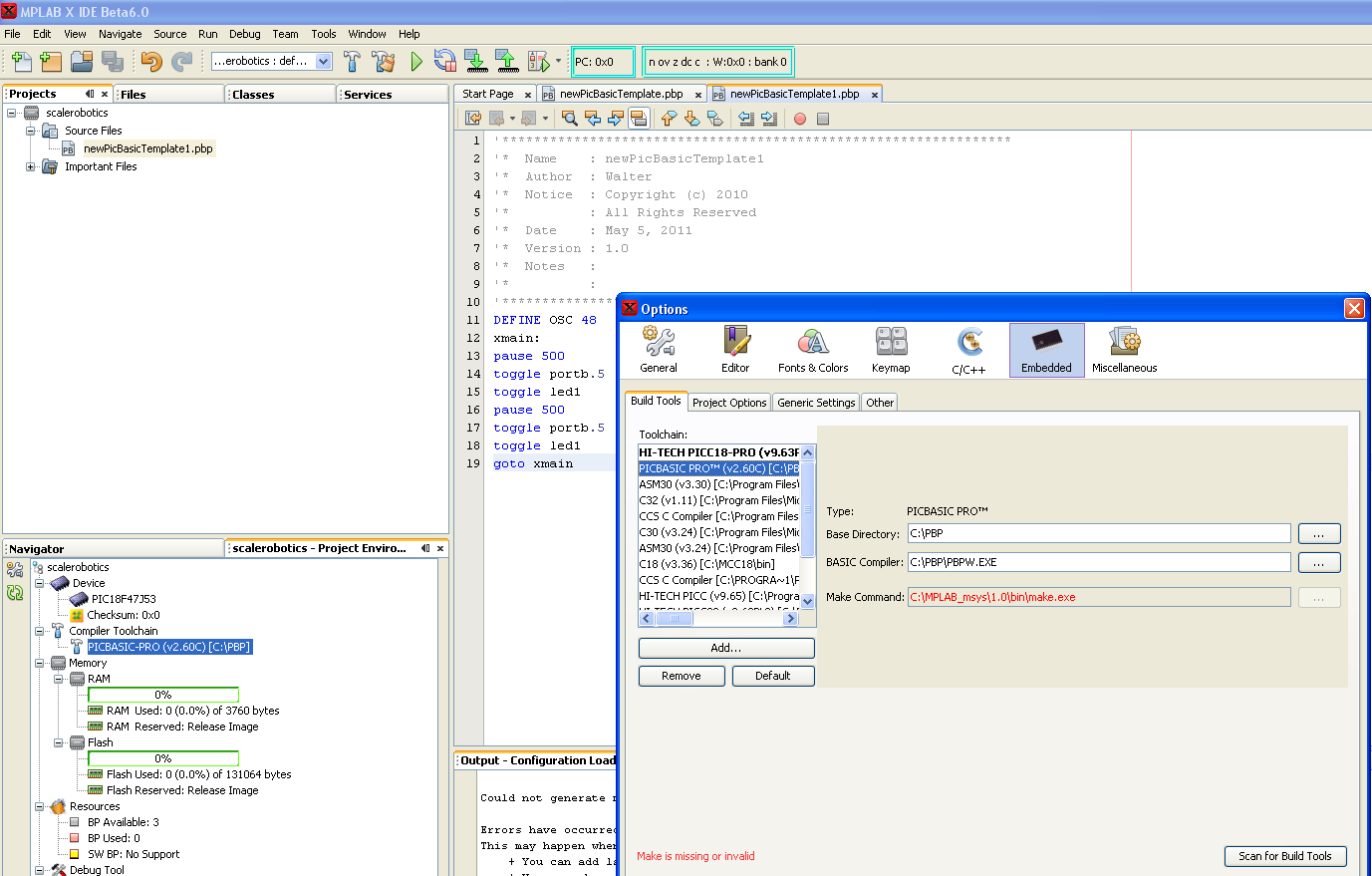
I've got proof ....
Proof that it doesn't work for me ....
But I obviously don't get as far as Alain.
|
Re: A new MPLAB IDE
I installed MPLAB when I reinstalled everything recently, I just never got around to giving it a 2nd look.
Right now MCSP does pretty much all I need so I'm content.
I don't know what either one is anyways....
It lacks code folding (so does MPLAB 8.xx when used with PBP, AFAIK) and it lacks "true" source level debugging.
...
True source is being able to look at the assembler-generated code maybe?
So I fired up MCSP to see what the last dates were in the HELP/ABOUT; 2001, 2005.
So I clicked on the FORUM to see what that looked like and it sent me here. LOL
 Members who have read this thread : 0
You do not have permission to view the list of names.
 Posting Permissions



Bookmarks