It would be nice if this config fuse tool could parse the xxx.inc file, and post these options for you. That way, as new chips are given, the new .inc file inputs the data, without manual input. It is all here.
Code:
;       Configuration Bits
;
;   NAME            Address
;   CONFIG1H        300001h
;   CONFIG2L        300002h
;   CONFIG2H        300003h
;   CONFIG3L        300004h
;   CONFIG3H        300005h
;   CONFIG4L        300006h
;   CONFIG5L        300008h
;   CONFIG5H        300009h
;   CONFIG6L        30000Ah
;   CONFIG6H        30000Bh
;   CONFIG7L        30000Ch
;   CONFIG7H        30000Dh
;
;==========================================================================

; The following is an assignment of address values for all of the
; configuration registers for the purpose of table reads
_CONFIG1H        EQU  H'300001'
_CONFIG2L        EQU  H'300002'
_CONFIG2H        EQU  H'300003'
_CONFIG3L        EQU  H'300004'
_CONFIG3H        EQU  H'300005'
_CONFIG4L        EQU  H'300006'
_CONFIG5L        EQU  H'300008'
_CONFIG5H        EQU  H'300009'
_CONFIG6L        EQU  H'30000A'
_CONFIG6H        EQU  H'30000B'
_CONFIG7L        EQU  H'30000C'
_CONFIG7H        EQU  H'30000D'

;----- CONFIG1H Options --------------------------------------------------
_OSC_LP_1H           EQU  H'F0'    ; LP
_OSC_XT_1H           EQU  H'F1'    ; XT
_OSC_HS_1H           EQU  H'F2'    ; HS
_OSC_RC2_1H          EQU  H'F3'    ; External RC, RA6 is CLKOUT
_OSC_EC_1H           EQU  H'F4'    ; EC, RA6 is CLKOUT
_OSC_ECIO_1H         EQU  H'F5'    ; EC, RA6 is I/O
_OSC_HSPLL_1H        EQU  H'F6'    ; HS-PLL Enabled
_OSC_RCIO_1H         EQU  H'F7'    ; External RC, RA6 is I/O
_OSC_IRCIO_1H        EQU  H'F8'    ; Internal RC, RA6 & RA7 are I/O
_OSC_IRC_1H          EQU  H'F9'    ; Internal RC, RA6 is CLKOUT, RA7 is I/O
_OSC_RC1_1H          EQU  H'FB'    ; External RC, RA6 is CLKOUT
_OSC_RC_1H           EQU  H'FF'    ; External RC, RA6 is CLKOUT

_FCMEN_OFF_1H        EQU  H'BF'    ; Disabled
_FCMEN_ON_1H         EQU  H'FF'    ; Enabled

_IESO_OFF_1H         EQU  H'7F'    ; Disabled
_IESO_ON_1H          EQU  H'FF'    ; Enabled

;----- CONFIG2L Options --------------------------------------------------
_PWRTEN_ON_2L        EQU  H'FE'    ; Enabled
_PWRTEN_OFF_2L       EQU  H'FF'    ; Disabled

_BOREN_OFF_2L        EQU  H'FD'    ; Disabled
_BOREN_ON_2L         EQU  H'FF'    ; Enabled

_BORV_45_2L          EQU  H'F3'    ; 4.5V
_BORV_42_2L          EQU  H'F7'    ; 4.2V
_BORV_27_2L          EQU  H'FB'    ; 2.7V
_BORV_20_2L          EQU  H'FF'    ; 2.0V

;----- CONFIG2H Options --------------------------------------------------
_WDTEN_OFF_2H        EQU  H'FE'    ; Disabled
_WDTEN_ON_2H         EQU  H'FF'    ; Enabled

_WINEN_ON_2H         EQU  H'DF'    ; Enabled
_WINEN_OFF_2H        EQU  H'FF'    ; Disabled

_WDPS_1_2H           EQU  H'E1'    ; 1:1
_WDPS_2_2H           EQU  H'E3'    ; 1:2
_WDPS_4_2H           EQU  H'E5'    ; 1:4
_WDPS_8_2H           EQU  H'E7'    ; 1:8
_WDPS_16_2H          EQU  H'E9'    ; 1:16
_WDPS_32_2H          EQU  H'EB'    ; 1:32
_WDPS_64_2H          EQU  H'ED'    ; 1:64
_WDPS_128_2H         EQU  H'EF'    ; 1:128
_WDPS_256_2H         EQU  H'F1'    ; 1:256
_WDPS_512_2H         EQU  H'F3'    ; 1:512
_WDPS_1024_2H        EQU  H'F5'    ; 1:1024
_WDPS_2048_2H        EQU  H'F7'    ; 1:2048
_WDPS_4096_2H        EQU  H'F9'    ; 1:4096
_WDPS_8192_2H        EQU  H'FB'    ; 1:8192
_WDPS_16384_2H       EQU  H'FD'    ; 1:16384
_WDPS_32768_2H       EQU  H'FF'    ; 1:32768

;----- CONFIG3L Options --------------------------------------------------
_T1OSCMX_OFF_3L      EQU  H'DF'    ; Active
_T1OSCMX_ON_3L       EQU  H'FF'    ; Inactive

_HPOL_LOW_3L         EQU  H'EF'    ; Active low
_HPOL_HIGH_3L        EQU  H'FF'    ; Active high

_LPOL_LOW_3L         EQU  H'F7'    ; Active low
_LPOL_HIGH_3L        EQU  H'FF'    ; Active high

_PWMPIN_ON_3L        EQU  H'FB'    ; Enabled
_PWMPIN_OFF_3L       EQU  H'FF'    ; Disabled

;----- CONFIG3H Options --------------------------------------------------
_MCLRE_OFF_3H        EQU  H'7F'    ; Disabled
_MCLRE_ON_3H         EQU  H'FF'    ; Enabled

;----- CONFIG4L Options --------------------------------------------------
_STVREN_OFF_4L       EQU  H'FE'    ; Disabled
_STVREN_ON_4L        EQU  H'FF'    ; Enabled

_LVP_OFF_4L          EQU  H'FB'    ; Disabled
_LVP_ON_4L           EQU  H'FF'    ; Enabled

_DEBUG_ON_4L         EQU  H'7F'    ; Enabled
_DEBUG_OFF_4L        EQU  H'FF'    ; Disabled

;----- CONFIG5L Options --------------------------------------------------
_CP0_ON_5L           EQU  H'FE'    ; Enabled
_CP0_OFF_5L          EQU  H'FF'    ; Disabled

_CP1_ON_5L           EQU  H'FD'    ; Enabled
_CP1_OFF_5L          EQU  H'FF'    ; Disabled

_CP2_ON_5L           EQU  H'FB'    ; Enabled
_CP2_OFF_5L          EQU  H'FF'    ; Disabled

_CP3_ON_5L           EQU  H'F7'    ; Enabled
_CP3_OFF_5L          EQU  H'FF'    ; Disabled

;----- CONFIG5H Options --------------------------------------------------
_CPB_ON_5H           EQU  H'BF'    ; Enabled
_CPB_OFF_5H          EQU  H'FF'    ; Disabled

_CPD_ON_5H           EQU  H'7F'    ; Enabled
_CPD_OFF_5H          EQU  H'FF'    ; Disabled

;----- CONFIG6L Options --------------------------------------------------
_WRT0_ON_6L          EQU  H'FE'    ; Enabled
_WRT0_OFF_6L         EQU  H'FF'    ; Disabled

_WRT1_ON_6L          EQU  H'FD'    ; Enabled
_WRT1_OFF_6L         EQU  H'FF'    ; Disabled

;----- CONFIG6H Options --------------------------------------------------
_WRTB_ON_6H          EQU  H'BF'    ; Enabled
_WRTB_OFF_6H         EQU  H'FF'    ; Disabled

_WRTC_ON_6H          EQU  H'DF'    ; Enabled
_WRTC_OFF_6H         EQU  H'FF'    ; Disabled

_WRTD_ON_6H          EQU  H'7F'    ; Enabled
_WRTD_OFF_6H         EQU  H'FF'    ; Disabled

;----- CONFIG7L Options --------------------------------------------------
_EBTR0_ON_7L         EQU  H'FE'    ; Enabled
_EBTR0_OFF_7L        EQU  H'FF'    ; Disabled

_EBTR1_ON_7L         EQU  H'FD'    ; Enabled
_EBTR1_OFF_7L        EQU  H'FF'    ; Disabled

;----- CONFIG7H Options --------------------------------------------------
_EBTRB_ON_7H         EQU  H'BF'    ; Enabled
_EBTRB_OFF_7H        EQU  H'FF'    ; Disabled


_DEVID1          EQU  H'3FFFFE'
_DEVID2          EQU  H'3FFFFF'

_IDLOC0          EQU  H'200000'
_IDLOC1          EQU  H'200001'
_IDLOC2          EQU  H'200002'
_IDLOC3          EQU  H'200003'
_IDLOC4          EQU  H'200004'
_IDLOC5          EQU  H'200005'
_IDLOC6          EQU  H'200006'
_IDLOC7          EQU  H'200007'
It would even be a start to be able to click on your selections, and have it bring up relevant code for both including in your code, or for adding to your PBP inc file.
like:
Code:
asm
    __CONFIG    _CONFIG1H, _OSC_HSPLL_1H
    __CONFIG    _CONFIG2H, _WDTEN_OFF_2H & _WDPS_512_2H
    __CONFIG    _CONFIG4L, _LVP_OFF_4L
endasm
It looks like Proton has a simple config "tool" here:
http://wiki.picbasic.org/index.php?n...seConfigurator
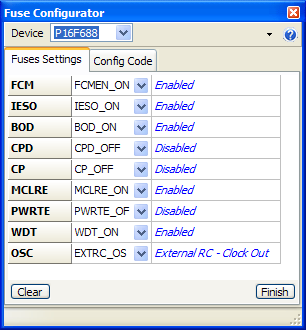
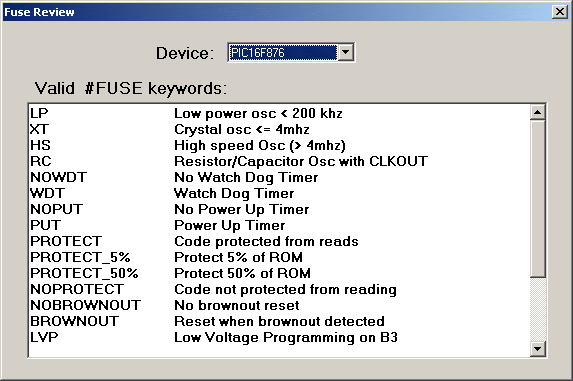
CCS just shows you the configs, like this:
It would be nice to expand on it, and make it easier. I think everyone has gotten stuck with configs. I know I sure have.
With a quick look around the net, I can't find any manufacturer or software maker that has made this very easy for any chip. You would think Microchip would be interested in this, as it would really give them an edge. Perhaps you can sell it to them when you are done!


 A header wizard


 Originally Posted by Ioannis


 tell you you could have an eye on the MikroE Edit Project Window ...


Bookmarks