Learning to walk again. (18F46J50 configuration)


Closed Thread
Results 1 to 27 of 27

Hybrid View

  1. #1
    Join Date
    Jan 2009
    Location
    California, USA
    Posts
    323


    Did you find this post helpful? Yes | No

    Default Still stumbling along, but I've almost got my feet under me... :)

    Wow, there's LOTS of "features" on a 18F46J50, and LOTS of registers and configuration thingies to set!
    And lots of RTFM'ing to be done to get this baby under control!

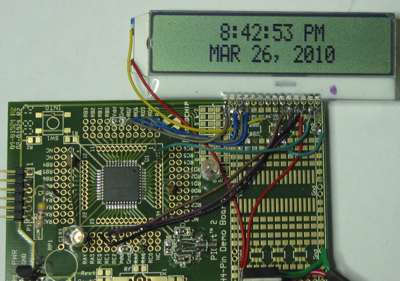
    Anyway, I've got far enough along to get the RTCC working and display the time to an LCD. Yay!
    Since there seems to be a shortage of info about the 18F46J50 here on the forum so far, I'll post my bit of working code. It's crude I'm sure, but it is functional and maybe it will be a helpful start for someone else.

    This code is enough to set up and turn on the RTCC module, using an external 32.768Khz xtal on the Timer1 Osc, and it displays the time on a 2 x 20 parallel LCD display.

    Here's my code, busted into 2 parts so it'll fit on the forum...

    Part 1: "Setup"

    Code:
    '****************************************************************
    '18F46J50 test program to turn on the RTCC and display time on a 2x20LCD
    '****************************************************************
    
    Include "MODEDEFS.BAS"   'Include Shiftin/out modes
    DEFINE LCD_DREG PORTD    'Set LCD Data port
    DEFINE LCD_DBIT 4        'Set starting Data bit (0 or 4) if 4-bit bus
    DEFINE LCD_RSREG PORTE   'Set LCD Register Select port
    DEFINE LCD_RSBIT 0       'Set LCD Register Select bit
    DEFINE LCD_EREG PORTE    'Set LCD Enable port
    DEFINE LCD_EBIT 2        'Set LCD Enable bit
    DEFINE LCD_BITS 4        'Set LCD bus size (4 or 8 bits)
    Define OSC 8             '8MHz Oscillator
    
    '---SET UP A BUNCH OF REGISTERS----------
    OSCCON = %01111111      'idle enable off, 8MHz clock, primary clock source
    ADCON0 = 0              'Turn OFF the ADC  
    ANCON0 = %11111111      'Analog Port Configuration bits (AN7-AN0) 1 = Digital, 0 = analog       
    ANCON1 = %00011111      'Analog Port Configuration bits (AN12-AN8) 1 = Digital, 0 = analog
    
    PMCONH.7 = 0            'Parallel Master Port Enable = OFF
    PMCONH.2 = 0            'Byte Enable Port Enable = OFF
    PMCONH.1 = 0            'Write Enable Strobe Port Enable = OFF
    PMCONH.0 = 0            'Read/Write Strobe Port Enable = OFF
    PMEH = 0                'PARALLEL PORT ENABLE REGISTER HIGH BYTE = OFF
    PMEL = 0                'PARALLEL PORT ENABLE REGISTER LOW BYTE = OFF
    
    RTCCFG = %10100100      'RTCC CONFIGURATION REGISTER ... sets up some of the RTCC stuff
    'RTCCAL = %00000000     'RTCC CALIBRATION REGISTER ... 0 = no adjustment
    PADCFG1 = 0             'PAD CONFIGURATION REGISTER  
    T1CON = %10001111       '
    
    TRISA = %00000000   'Set PORTA to outputs
    TRISB = %00000000   'Set PORTB to outputs
    TRISC = %00000000   'Set PORTC to outputs
    TRISD = %00000000   'Set PORTD to outputs
    TRISE = %00000000   'Set PORTE to outputs
    
    '---PERIPHERAL CONFIGURATION REGISTERS---------------------------
    
    PPSCON = 0               'PERIPHERAL PIN SELECT INPUT REGISTER 0  --  0 = unlocked, 1 = locked
    
    '-------INPUT PIN SELECT-----------------------------------------
    RPINR1 = 27              'PERIPHERAL PIN SELECT INPUT REGISTER 1   ' SET ALL PERIPHERALS TO A NON-EXISTANT PIN [27] (no peripherals selected on any pin)
    RPINR2 = 27              'PERIPHERAL PIN SELECT INPUT REGISTER 2
    RPINR3 = 27              'PERIPHERAL PIN SELECT INPUT REGISTER 3
    RPINR4 = 27              'PERIPHERAL PIN SELECT INPUT REGISTER 4
    RPINR6 = 27              'PERIPHERAL PIN SELECT INPUT REGISTER 6
    RPINR7 = 27              'PERIPHERAL PIN SELECT INPUT REGISTER 7
    RPINR8 = 27              'PERIPHERAL PIN SELECT INPUT REGISTER 8
    RPINR12 = 27             'PERIPHERAL PIN SELECT INPUT REGISTER 12
    RPINR13 = 27             'PERIPHERAL PIN SELECT INPUT REGISTER 13
    RPINR16 = 27             'PERIPHERAL PIN SELECT INPUT REGISTER 16
    RPINR17 = 27             'PERIPHERAL PIN SELECT INPUT REGISTER 17
    RPINR21 = 27             'PERIPHERAL PIN SELECT INPUT REGISTER 21
    RPINR22 = 27             'PERIPHERAL PIN SELECT INPUT REGISTER 22
    RPINR23 = 27             'PERIPHERAL PIN SELECT INPUT REGISTER 23
    RPINR24 = 27             'PERIPHERAL PIN SELECT INPUT REGISTER 24
    
    '-------OUTPUT PIN SELECT-----------------------------------------
    RPOR0 = 0               'PERIPHERAL PIN SELECT OUTPUT REGISTER 0  'SET ALL OUTPUTS TO THE "NULL" SETTING (no peripherals selected on any pin)
    RPOR1 = 0               'PERIPHERAL PIN SELECT OUTPUT REGISTER 1
    RPOR2 = 0               'PERIPHERAL PIN SELECT OUTPUT REGISTER 2
    RPOR3 = 0               'PERIPHERAL PIN SELECT OUTPUT REGISTER 3
    RPOR4 = 0               'PERIPHERAL PIN SELECT OUTPUT REGISTER 4
    RPOR5 = 0               'PERIPHERAL PIN SELECT OUTPUT REGISTER 5
    RPOR6 = 0               'PERIPHERAL PIN SELECT OUTPUT REGISTER 6
    RPOR7 = 0               'PERIPHERAL PIN SELECT OUTPUT REGISTER 7
    RPOR8 = 0               'PERIPHERAL PIN SELECT OUTPUT REGISTER 8
    RPOR9 = 0               'PERIPHERAL PIN SELECT OUTPUT REGISTER 9
    RPOR10 = 0              'PERIPHERAL PIN SELECT OUTPUT REGISTER 10
    RPOR11 = 0              'PERIPHERAL PIN SELECT OUTPUT REGISTER 11
    RPOR12 = 0              'PERIPHERAL PIN SELECT OUTPUT REGISTER 12
    RPOR13 = 0              'PERIPHERAL PIN SELECT OUTPUT REGISTER 13
    RPOR17 = 14              'PERIPHERAL PIN SELECT OUTPUT REGISTER 17  'CCP1 routed to RP17 (for the LCD contrast)
    RPOR18 = 0              'PERIPHERAL PIN SELECT OUTPUT REGISTER 18
    RPOR19 = 0              'PERIPHERAL PIN SELECT OUTPUT REGISTER 19
    RPOR20 = 0              'PERIPHERAL PIN SELECT OUTPUT REGISTER 20
    RPOR21 = 0              'PERIPHERAL PIN SELECT OUTPUT REGISTER 21
    RPOR22 = 0              'PERIPHERAL PIN SELECT OUTPUT REGISTER 22
    RPOR23 = 0              'PERIPHERAL PIN SELECT OUTPUT REGISTER 23
    RPOR24 = 0              'PERIPHERAL PIN SELECT OUTPUT REGISTER 24
    
    
     '---ALIAS PINS-------------------------
    RW              var     PORTE.1             'LCD READ/WRITE
    LED1            VAR     PORTB.4             'Blinky thing 1
    LED2            var     PORTD.0             'Blinky thing 2
    LCDcontrast     var     PORTC.6             'HPWM for LCD contrast
    
    '---ALLOCATE VARIABLES----------------- 
    contrast        var     word   'LCD contrast
    timevall        var     word                    'temporary storage for rtcvall
    timevalh        var     word                    'temporary storage for rtcvalh
    weekdaynum      var     word                    'Weekdaynum = 0-6  (0= sunday, 1= monday, etc)
    weekday         var     byte[9]                 'monday, tuesday, wednesday, etc
    year            var     word                    'year = 0 - 99
    month           var     word
    monthname       var     byte[3]                 'jan, feb, mar, etc                     
    day             var     word
    hours           var     word
    minutes         var     word
    seconds         var     word
    pmflag          var     word
    
    '---SET SOME VARIABLES-----------------
    RW = 0             'LCD R/W = Write
    led1 = 0           'Turn the LED off
    led2 = 0           'Turn the LED off
    contrast = 200     'Set LCD contrast (0-255) [0 = max contrast, 255 = min]
    
    '-----------------------------------------------------------------------------------------------------------------
    '-----------------------------------------------------------------------------------------------------------------
    end of part1....

  2. #2
    Join Date
    Jan 2009
    Location
    California, USA
    Posts
    323


    Did you find this post helpful? Yes | No

    Default

    Part2...

    Code:
    '-----------------------------------------------------------------------------------------------------------------
    '-----------------------------------------------------------------------------------------------------------------
    
    '---ENOUGH SETUP, LET'S GET STARTED................
    HPWM 1, contrast, 500   'set the LCD contrast
    Pause 1000   'wait for the LCD to wake up
    lcdout $fe, 1   'Clear LCD
    
    asm  ;This bit of code turns ON the RTC WRITE ENABLE. It MUST be done in ASM... RTFM- "16.2.7 WRITE LOCK", "SETTING THE RTCWREN BIT"
        movlb 0x0F ;RTCCFG is banked
        bcf INTCON, GIE ;Disable interrupts
        movlw 0x55
        movwf EECON2
        movlw 0xAA
        movwf EECON2
        bsf RTCCFG,RTCWREN
    endasm
    RTCCFG.7 = 1  'turn on the RTCC module
    
    '!!!!!!!!!!!!!!!!!!!USER SETTING!!!!!!!!!!!!!!!!!!!!!!!!!!!!!!!
    '---USER CAN SET THE CLOCK HERE----------------------------
    year = 10      '(last 2 digits of the millenium, 0-99)
    month = 03     '(1-12)
    day = 26       '(1-31)
    hours = 19     '(0-23)
    minutes = 29   '(0-59)
    seconds = 00   '(0-59)
    weekdaynum = 6 '(0-6)  (0=sunday, 1= monday, etc)
    '!!!!!!!!!!!!!!!!!//USER SETTING//!!!!!!!!!!!!!!!!!!!!!!!!!!!!!
    '----------------------------------------------------------
    
    Gosub settime 'put the user settings into the time registers
    RTCCFG.5 = 0   'disable RTC write enable
    
    goto main  'skip the subroutines and JGIG
    
    '--SUBROUTINES!----------------------------------------------------------------
    '---SUBROUTINE TO CONVERT USER ENTRY TO BCD AND LOAD THE TIME REGISTERS---------
    settime: '------(RTCPTR<1:0> automatically decrements by 1 each time RTCVALH is read or written to) RTFM, TABLE 16-3--------
        RTCCFG.1 = 1 'set RTCPTR1
        RTCCFG.0 = 1 'set RTCPTR0
        rtcvall = year dig 1 *16 + year dig 0  'set year
        rtcvalh = 00  'unused... just send something to rtcvalh so it will increment the pointer
        rtcvall= day dig 1 *16 + day dig 0  'set day
        rtcvalh = month dig 1 *16 + month dig 0 'set month
        rtcvall= hours dig 1 *16 + hours dig 0  'set hours
        rtcvalh = weekdaynum   'set weekday (0-6)
        rtcvall= seconds dig 1 *16 + seconds dig 0  'set seconds
        rtcvalh = minutes dig 1 *16 + minutes dig 0 'set minutes
    return
    '-----------------------------------------
    
    '---SUBROUTINE TO CONVERT THE BCD FOR EASY DISPLAY----------
    convertBCD:
        timevall = ((timevall/16)*10)+(timevall & %00001111)
        timevalh = ((timevalh/16)*10)+(timevalh & %00001111)
    return
    '------------------------------------------
    
    '---SUBROUTINE TO CONVERT MONTH NUMBER TO REAL TEXT-------------------
    decodemonth:   'there's GOT to be a better way to convert an index number to a string...
        if month = 1 then monthname[0] = "J": monthname[1] = "A": monthname[2] = "N"
        if month = 2 then monthname[0] = "F": monthname[1] = "E": monthname[2] = "B"
        if month = 3 then monthname[0] = "M": monthname[1] = "A": monthname[2] = "R"
        if month = 4 then monthname[0] = "A": monthname[1] = "P": monthname[2] = "R"
        if month = 5 then monthname[0] = "M": monthname[1] = "A": monthname[2] = "Y"
        if month = 6 then monthname[0] = "J": monthname[1] = "U": monthname[2] = "N"
        if month = 7 then monthname[0] = "J": monthname[1] = "U": monthname[2] = "L"
        if month = 8 then monthname[0] = "A": monthname[1] = "U": monthname[2] = "G"
        if month = 9 then monthname[0] = "S": monthname[1] = "E": monthname[2] = "P"
        if month = 10 then monthname[0] = "O": monthname[1] = "C": monthname[2] = "T"
        if month = 11 then monthname[0] = "N": monthname[1] = "O": monthname[2] = "V"
        if month = 12 then monthname[0] = "D": monthname[1] = "E": monthname[2] = "C"
    return
    '-----------------------------------------------------------------------------------
    '---[/subroutines]---------------------------------------------------------
    
    
    '-----------------------------------------------------------------------
    '---MAIN PROGRAM--------------------------------------------------------
    Main:
        '---set RTCPTR1 & RTCPTR2 to 11--- 
        RTCCFG.1 = 1  'set RTCPTR1 (RTCPTR<1:0> automatically decrements by 1 each time RTCVALH is read or written to) RTFM, TABLE 16-3--------
        RTCCFG.0 = 1  'set RTCPTR0
        
        '---get year---
        timevall = rtcvall
        timevalh = rtcvalh
        gosub convertBCD
        year = timevall
        
        '---get month and day---
        timevall = rtcvall
        timevalh = rtcvalh
        gosub convertBCD
        month = timevalh
        day = timevall
        
        '---get weekday and hours---
        timevall = rtcvall
        timevalh = rtcvalh
        gosub convertBCD
        weekdaynum = timevalh
        hours = timevall
        
        '---get minutes and seconds---
        timevall = rtcvall
        timevalh = rtcvalh
        gosub convertBCD
        minutes = timevalh
        seconds = timevall
        
        '---do the 24/12 hour dance---
        If hours > 11 then
            pmflag = "P"
            else
            pmflag = "A"
            endif        
        if hours > 12 then hours = hours - 12
        if hours = 0 then hours = 12
        
        gosub decodemonth
             
        '---display it all---
        lcdout $fe,2,"     ",dec hours,":",DEC2 minutes,":",Dec2 seconds," ",pmflag,"M  ",$fe,$c0,"    ",STR monthname\3," ",dec day,", 20",dec year
        pause 30 'Slow down you move too fast, You've got to make the morning last. Just skippin' down the cobble stones, Lookin' for fun and feelin' groovy
        
     goto main
    
    end
    end of part 2...
    Last edited by Byte_Butcher; - 27th March 2010 at 05:50.

  3. #3
    Join Date
    Jan 2009
    Location
    California, USA
    Posts
    323


    Did you find this post helpful? Yes | No

    Default

    And here's my configuration settings in the 18F46J50.INC file:

    Code:
    ;****************************************************************
            NOLIST
        ifdef PM_USED
            LIST
            "Error: PM does not support this device.  Use MPASM."
            NOLIST
        else
            LIST
    ;;;        LIST p = 18F46J50, r = dec, w = -311, f = inhx32
            LIST p = 18F46J50, r = dec, w = -311
            INCLUDE "P18F46J50.INC"	; MPASM  Header
    
    	CONFIG XINST = OFF
    	CONFIG STVREN = OFF
    	CONFIG PLLDIV = 2
    	CONFIG WDTEN = OFF
    
    	CONFIG CP0 = OFF
    	CONFIG CPUDIV = OSC1
    
    	CONFIG IESO = OFF
    	CONFIG FCMEN = OFF
    	CONFIG LPT1OSC = OFF
    	CONFIG T1DIG = OFF	
    	CONFIG OSC = INTOSCO  ;Internal OSC, with output on RA6
    	CONFIG DSBOREN = OFF
    	CONFIG DSWDTEN = OFF
    
    ;	CONFIG RTCOSC = INTOSCREF  ;Internal OSc for the RTC
    
    	CONFIG RTCOSC = T1OSCREF    ;RTCC uses T1OSC/T1CKI
    
            NOLIST
        endif
            LIST
    BLOCK_SIZE	EQU	64
    steve

  4. #4
    Join Date
    Nov 2003
    Location
    Wellton, U.S.A.
    Posts
    5,924


    Did you find this post helpful? Yes | No

    Default

    WOW! Thanks Steve.

    Now you have me thinking about trying the beast also
    Dave
    Always wear safety glasses while programming.

  5. #5
    Join Date
    Jan 2009
    Location
    California, USA
    Posts
    323


    Did you find this post helpful? Yes | No

    Default

    The obligatory photo of the test board and display:


    steve

  6. #6
    Join Date
    Jan 2009
    Location
    California, USA
    Posts
    323


    Did you find this post helpful? Yes | No

    Default

    Quote Originally Posted by mackrackit View Post
    WOW! Thanks Steve.

    Now you have me thinking about trying the beast also
    It's a big chunk of data sheet to read for sure. (554 pgs) It's a lot to absorb for someone of my... limited... skill level & experience.

    You won't have any trouble I'm sure Dave.

    I suppose the next step for me is to figure out how to make the USB work...


    steve

  7. #7
    Join Date
    Nov 2003
    Location
    Wellton, U.S.A.
    Posts
    5,924


    Did you find this post helpful? Yes | No

    Default

    USB is something I have not played with yet. It will be interesting to see how it goes.

    Keep us posted...
    Dave
    Always wear safety glasses while programming.

  8. #8
    Join Date
    Jan 2009
    Location
    Miami, Florida USA
    Posts
    704


    Did you find this post helpful? Yes | No

    Default

    This chip seems to be a nice upgrade to the more common USB-capable 18F4550. The 18F46J50 has 64 Kbytes of programming memory compared to 32 Kbytes of the 18F4550.

    Also, the 18F46J50 has a very interesting feature which is "On-Chip USB Transceiver with Crystal-less operation". Which means "High-Precision Internal Oscillator (±0.15% typ.) for USB", so no need for an external crystal oscillator . I will keep this chip in mind for my own projects.

    Now you have me thinking about trying the beast also

    USB is something I have not played with yet. It will be interesting to see how it goes.
    mackrackit,

    Even a rookie like me got the USB working on a 18F4550, so you shouldn't have any problems. But, I do recommend starting with a 18F4550 chip, which is a lot easier to work with and it is well documented in this forum. The 18F46J50 chip seems to be a lot harder to make it work.

    Robert

  9. #9
    Join Date
    Jan 2009
    Location
    Miami, Florida USA
    Posts
    704


    Did you find this post helpful? Yes | No

    Default

    Quote Originally Posted by Byte_Butcher View Post
    I suppose the next step for me is to figure out how to make the USB work...


    steve
    Steve,

    Were you ever able to make the USB interface work in this 18F46J50 chip? Do you mind sharing your findings with us? I have been thinking about upgrading my 18F4550 to a 18F46J50.

    Robert

Members who have read this thread : 0

You do not have permission to view the list of names.

Posting Permissions

  • You may not post new threads
  • You may not post replies
  • You may not post attachments
  • You may not edit your posts