Any tips for 4-layer boards?


Closed Thread
Results 1 to 31 of 31

Hybrid View

  1. #1
    Join Date
    Jan 2009
    Location
    California, USA
    Posts
    323


    Did you find this post helpful? Yes | No

    Default

    Well I just tried Melanie's "Easy Contrast" circuit and it works great!
    I tried with and without a filter cap and there's no visible difference.
    I ended up using 2K and 1K resistors because I had some laying within arms reach and it gives good control.

    That's cheaper and uses less real estate than a trimpot, and it gives the user control that I was going to use a digital pot to achieve. With only 2 resistors.

    Most Excellent! Thanks Melanie!


    steve

  2. #2
    Join Date
    Jan 2009
    Location
    California, USA
    Posts
    323


    Did you find this post helpful? Yes | No

    Default I got it all on 2-layers!

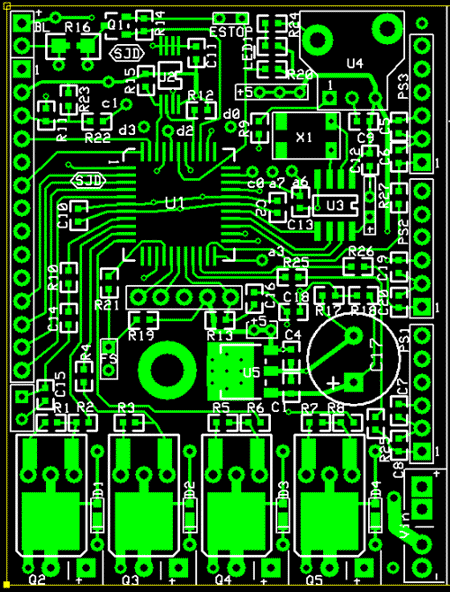
    Well, I shuffled a bunch of stuff around, made a few circuit changes, and presto!
    It all fits on 2-layers now.

    5 IC's
    19 Capacitors
    28 Resistors
    5 Transistors
    4 Diodes
    1 Crystal,
    1 LED
    + connectors and wires to the outside world.... power supply, sensors, LCD, etc.

    All on a board that's about 2.5" high and less than 2" wide.

    Thanks to everyone that provided suggestions and insight. Much appreciated.


    steve


  3. #3
    Join Date
    Nov 2003
    Location
    Greece
    Posts
    4,184


    Did you find this post helpful? Yes | No

    Default

    Thats great news! Now, how are you going to solder components?

    Ioannis

  4. #4
    Join Date
    Jan 2009
    Location
    California, USA
    Posts
    323


    Did you find this post helpful? Yes | No

    Default

    Quote Originally Posted by Ioannis View Post
    Thats great news! Now, how are you going to solder components?
    I've got some good stout radiator solder and a propane torch.

    Actually, I'm modestly well setup to do SMD boards. I have a homemade reflow oven (modified toaster oven) and a cheap hot air rework station.
    I've done quite a few small SMD boards but nothing quite as tight as the current one.

    Here's a basic PIC controller board with RTC and EEPROM on board. Various versions of it lounge around on my bench, being test beds for assorted projects...


    Since this latest board has up to 63 parts on less than 5 square inches, I'll definitely cough up the extra $$ to have silkscreen and soldermask on this one.

    I'm glad it all went on 2 layers. I was willing to go to 4, but cheaper is better...


    steve

  5. #5


    Did you find this post helpful? Yes | No

    Default What does it do?

    Outside of reading temperatures, that is? Just seems like a pretty beefy processor to read/display temperatures, so am merely curious.

  6. #6
    Join Date
    Jan 2009
    Location
    California, USA
    Posts
    323


    Did you find this post helpful? Yes | No

    Default

    Quote Originally Posted by TinkersALot View Post
    Outside of reading temperatures, that is? Just seems like a pretty beefy processor to read/display temperatures, so am merely curious.
    Nahhh, you're missing the point!
    It's not about displaying temperature.... It's a learning platform!
    (that photo looks like it was a learning test for the MCP9800)

    It's a board that holds a $3 PIC that has lots of I/O .
    It has space for additional EEPROM if you feel like doing some data logging. It's got provisions for a DS1302 RTC if you need real time (to go with your data logging, or whatever?) (if you don't need that junk, don't load it)

    It's got a connector to connect to an LCD display so you can... display stuff.
    It's got an onboard MOSFET to control the brightness of the LCD backlight.

    It's got all the excess I/O ins brought out where they can be used to play with all kinds of sensors or... stuff.

    That board is not just about reading/displaying temperature. It's useful for all kinds of tasks!

    That circuit board, fully loaded with all the options RTC, EEPROM, Onboard voltage regulator, LCD connector, etc costs about $15.

    It's a learning tool for a PIC. What would you like to learn today?


    steve

  7. #7


    Did you find this post helpful? Yes | No

    Default Thanks for the reply!

    Before anything else: Congratulations and Nice Job! This does look like it was a great learning experience -- especially with regard to re-arranging some parts and getting it to route into two layers. Interesting thread to read as well.

    Don't mean to be thick-skulled about the purpose of your efforts. It is a neat board and project.

Similar Threads

  1. Labeling Circuit Boards
    By Atom058 in forum General
    Replies: 7
    Last Post: - 1st August 2008, 15:43
  2. making small boards
    By fowardbias in forum Off Topic
    Replies: 4
    Last Post: - 15th April 2008, 08:58
  3. Replies: 8
    Last Post: - 5th January 2007, 05:10

Members who have read this thread : 0

You do not have permission to view the list of names.

Posting Permissions

  • You may not post new threads
  • You may not post replies
  • You may not post attachments
  • You may not edit your posts