Any tips for 4-layer boards?


Closed Thread
Results 1 to 31 of 31

Hybrid View

  1. #1
    Join Date
    Apr 2006
    Location
    New Hampshire USA
    Posts
    298


    Did you find this post helpful? Yes | No

    Default Don't jump!

    Hi guys,

    Sounds like you guys have come up with some good ideas for squeezing the most components into the least real-estate. What might work would be insulated jumpers in place of the added layers. Circuit board designers have a prejudice against jumpers, but I have used them to avoid additional layers. Just force the layout with two layers then rearrange for the least and shortest “air-wires”. The jumpers would replace the air-wires.

    We want to see pictures of your projects! Past and future.

    -Adam-
    Ohm it's not just a good idea... it's the LAW !

  2. #2
    Join Date
    Feb 2006
    Location
    Gilroy, CA
    Posts
    1,530


    Did you find this post helpful? Yes | No

    Default

    When I need to pack the most parts per inch, I start populating the bottom side with a few of the parts I can't fit on the top. I never had to go to 4 layer.

  3. #3
    Join Date
    Nov 2003
    Location
    Greece
    Posts
    4,170


    Did you find this post helpful? Yes | No

    Default

    Triple check. What else can I suggest?

    What is your design program? In Eagle there are some tools that help to find shorts or unconnected parts.

    Use these tools to make it easier for checking.

    Photos would be great for this!

    Good luck and keep us posted.

    Ioannis

  4. #4
    Join Date
    Jan 2009
    Location
    California, USA
    Posts
    323


    Did you find this post helpful? Yes | No

    Default

    Thanks Guys for all the good suggestions!

    If this thing works well I hope to make a commercial product out of it, so ease of assembly and a minimum amount of "external" wiring that needs to be hand soldered is important.
    I want 6 boards to build prototypes, and if all goes well I'll order 100 more for my second round. So it's not just a "one of" project. and It needs to be easy to assemble and reasonably "proffesional".

    In the long run, I think that Ioannis had the most practical suggestion for this board.... Triple Check!! (I knew that anyway)

    I don't think that a pair of stacked 2 layer boards saves any money on board costs (4-layer costs less than twice as much as 2 layer), but probably does add quite a bit to assembly time.

    I already tried putting some parts on the backside of the board, but that didn't seem to help. The back is already dense with traces and parts on the back just eats up space where traces need to go and nothing is really gained. Besides, I dislike populating both sides on SMD boards because it's a bitch to keep parts from falling off the bottom when the board is in the oven and I don't relish the idea of soldering one side by hand. I know there's special glues available for that, but that takes more time so I'd rather not populate both sides if I can avoid it.
    I'm not a big fan of jumpers and "air wires". I DO use them sometimes, but again, it means more hand soldering and possibility of problems. And I'm afraid I'd need many of them for this board. Besides, jumpers require through holes, which kills space on BOTH sides of a board.

    I think I'm doomed to go with 4-layer boards on this one. It's OK. I need to learn to become proficient at 4-layer anyway since parts keep getting smaller and smaller, and 4-layer does have some advantages with noise immunity.

    I use DIPTrace for my schematic layout, and if I want quite a few boards I use DIPTrace for the board layout also. However, if I just need a few small boards at the lowest possible cost, then I order them from ExpressPCB, which means I'm stuck using their irritating board layout software. (Love their board quality and prices, hate the layout software)

    DIPTrace does have some good tools for verifying the integrity of networks and the like. And it IS possible (with a little work) to import the netlist from DIPTrace to ExpressPCB, so I'm pretty sure my board layout matches the schematic OK.

    I tried Eagle for a few boards, but I just didn't like it much. It seemed difficult and non-intuitive to learn and I finally gave it up. DIPTrace is more compatible with my brain I think.

    I worked on the board a bunch last night and I think I'm about done. I need to double check the footprints of a few items one more time, and also change the pad sizes where the LCD connects, but I think it's about ready to submit... I hope.

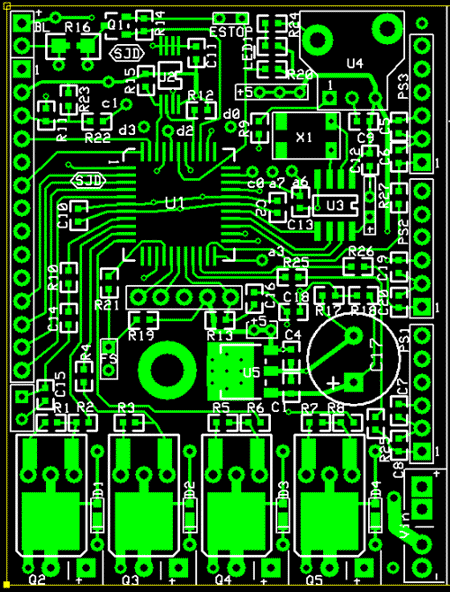
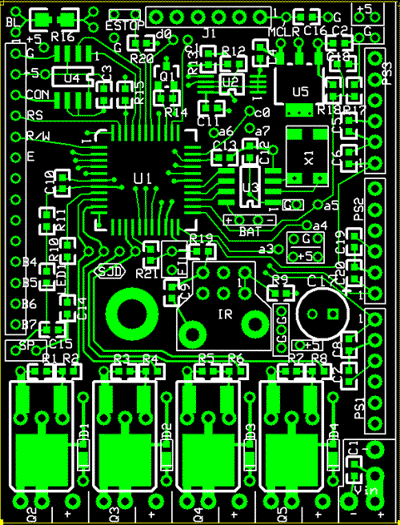
    Here's a pic of the top copper layer and silkscreen. Keep in mind that the entire board is only 2.5" (63.5mm) tall.


    Some of the patterns look a little "funny" because they are laid out to accept more than one package style. For example, Q's 2-5 can accept MOSFET's in either DPAK, or TO-220 (stood up)

    Thanks for all the suggestions. I'm gonna go with the "triple check" method and hope for the best!


    steve

  5. #5
    Join Date
    Jul 2003
    Posts
    2,358


    Did you find this post helpful? Yes | No

    Default

    If you want to make a commercial product, bear in mind that a THOUSAND VIAS will still cost less than a four layer board (which is basically two two-layer boards glued together). The only reason I can ever think of going into multi-layers is either Screening or Power Dissipation purposes. With good CAD software (and a good PCB manufacturer) your track separation can be as little as 0.15mm and there should be no need for four layers.

    (For those who don't know, a VIA is a tiny plated hole connecting two layers of a board.)

  6. #6
    Join Date
    Nov 2003
    Location
    Greece
    Posts
    4,170


    Did you find this post helpful? Yes | No

    Default

    I have not any experience wit 4 layers so cannot say if they are more expensive that many vias or not. But if Melanie says so, I accept it as a fact.

    So, indeed it looks dense enough but may be if you select other PIC pins thing can get easier.

    For your checking, does your software have any tools? Like highlighting the electric connections or showing the shorts, etc?

    Ioannis

  7. #7
    Join Date
    Jan 2009
    Location
    Miami, Florida USA
    Posts
    704


    Did you find this post helpful? Yes | No

    Default

    Hi,

    I have done many 2-layer SMD designs, but I have never done a 4-layer design. I agree with Melanie that the preferred way to go is to use many vias with 2-layer boards. There are many useful design tips in the next PDF document.

    http://www.alternatezone.com/electro...torialRevA.pdf

    I use pad2pad instead of expressPCB. Their software is very user friendly and it has features to check your design for flaws.

    Also, there are ways for programing your chip on board without having to solder a connector for programming purposes. Well, keep us posted about your project.

    Robert

Similar Threads

  1. Labeling Circuit Boards
    By Atom058 in forum General
    Replies: 7
    Last Post: - 1st August 2008, 16:43
  2. making small boards
    By fowardbias in forum Off Topic
    Replies: 4
    Last Post: - 15th April 2008, 09:58
  3. Replies: 8
    Last Post: - 5th January 2007, 06:10

Members who have read this thread : 0

You do not have permission to view the list of names.

Posting Permissions

  • You may not post new threads
  • You may not post replies
  • You may not post attachments
  • You may not edit your posts